
Memory and Context in OpenClaw: MEMORY.md, Compactions and Long-Term at Scale
AI has no native memory — but an operational agent needs it. BOTUM documents its memory architecture: MEMORY.md, daily notes, compactions, and management at the scale of a 15-agent production network.
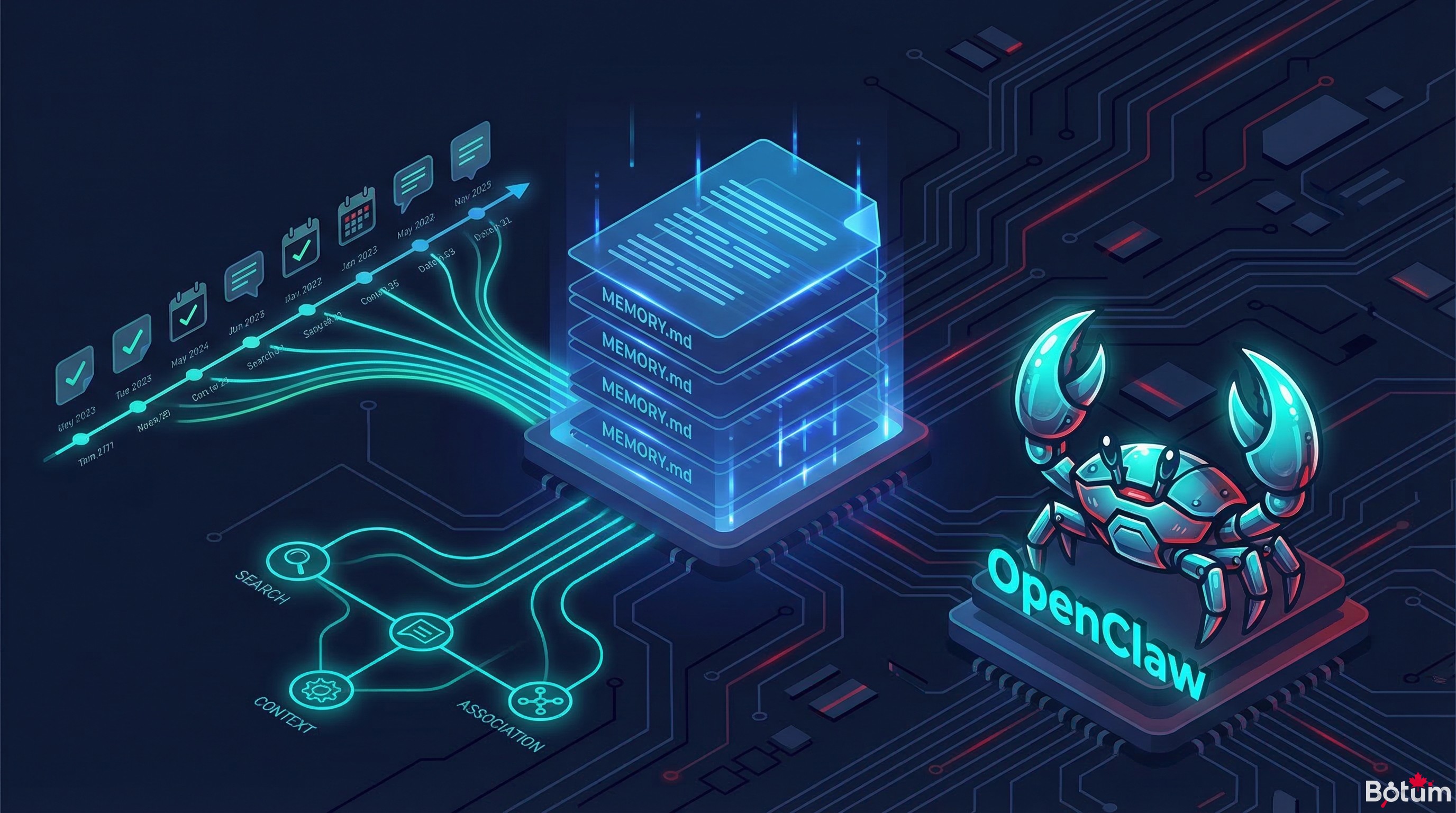
The intelligence of an operational agent depends entirely on its ability to remember. Not natively across sessions — but through a deliberate architecture, built and maintained by the teams deploying these systems.
The fundamental paradox of agentic AI: language models have no persistent memory. Each session starts from zero, as if the agent had just been switched on for the first time. And yet, an operational agent — managing emails, driving automations, making decisions on behalf of an organization — cannot function without continuity. BOTUM has solved this paradox. Here's how.
1. Context Window vs. Persistent Memory
The most common confusion among teams starting out with AI agents: conflating the context window with memory. These are two fundamentally different things.
The context window is the amount of information a model can process in a single session. Claude Sonnet handles approximately 200,000 tokens. Generous in appearance — insufficient in practice for an organization that has been running agents for 6 months. This window is volatile: it clears at the end of each session. It also saturates: when an agent accumulates logs, files, instructions, and conversations, the window fills quickly, and older information "falls off" — disappearing silently from the active context.
Persistent memory is what survives between sessions. It is an artifact of your infrastructure, not the model. It doesn't create itself: someone — or something — must decide what to write, where, and when.
What is lost when memory is not managed: decisions made in prior weeks, expressed preferences, already-documented errors, client contexts. What disappears from the context window is gone forever if it hasn't been written down somewhere.
2. MEMORY.md — Long-Term Memory
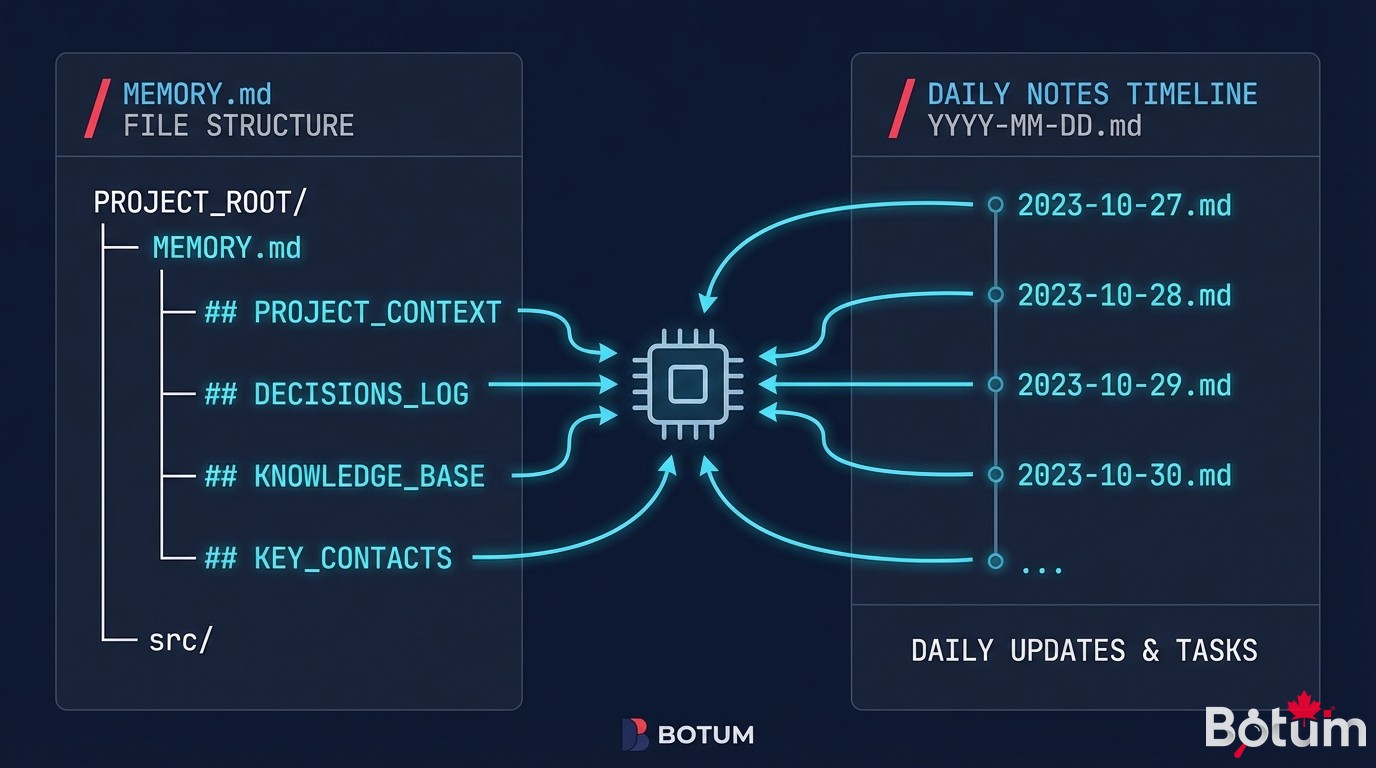
In the OpenClaw architecture, MEMORY.md is the consolidated memory file. It contains what must persist beyond individual sessions: permanent rules, important facts about the organization and its actors, structural decisions, established preferences.
What goes in it:
- Immutable agent rules (never CC this address, always format this way, etc.)
- Key organizational information (teams, contacts, recurring processes)
- Important decisions and their rationale
- Documented errors not to repeat
- Integrations and their quirks (this webhook behaves this way, this service responds slowly)
What doesn't go in it: raw event logs, one-off query results, today's conversations. These elements belong in daily notes.
BOTUM curation rules for MEMORY.md:
- Controlled size: target 2,000 to 5,000 tokens maximum. Beyond that, the file is itself a context problem.
- Stable sections: organize by domain (organization, agents, rules, integrations). Each section has a size cap.
- Active writing principle: never add anything without simultaneously deciding what it replaces or what can be removed.
- Git versioning: every modification to
MEMORY.mdis a commit. The history makes it possible to recover a rule accidentally deleted.
This file is read at the start of each main session. It is the context injection that allows the agent to "remember" — even though the underlying model remembers nothing.
3. Daily Notes — Raw Daily Logs
Daily notes (memory/YYYY-MM-DD.md) are the agent's logbook. Each day has its file. Things are captured in real time as they happen: actions taken, decisions made, notable events, errors encountered.
When to write in daily notes:
- After each significant action (email sent, script executed, configuration modified)
- When an implicit rule was applied (to make it explicit)
- When unexpected behavior was observed (for later investigation)
- When a decision was made that might be questioned later
What to capture:
- The what (precise action), the why (context), the result
- Heuristics used to resolve an ambiguity
- References (ticket number, client identifier, relevant URL)
- Warning signals that deserve attention (but don't yet justify action)
Daily notes are not written to be read in the current session — they are the archive that enables compaction and later search. Their value is not immediate: it is in accumulation.
4. Compactions — Distilling Memory
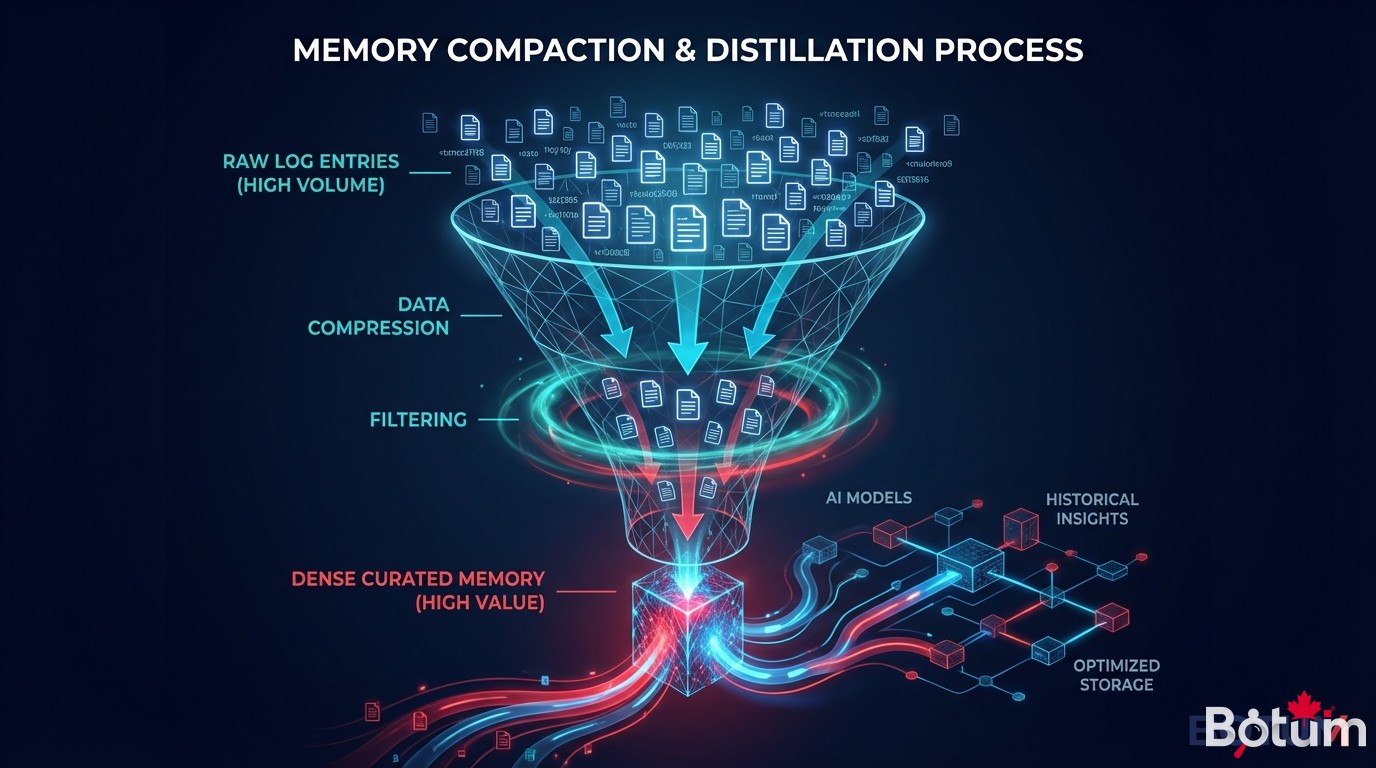
Compaction is the distillation operation: take a volume of daily notes and extract what deserves to survive in MEMORY.md. It is the most delicate task in agent memory management.
When to compact:
- When the context window approaches saturation (indicator: >40% utilization in a standard session)
- Periodically, independent of utilization (weekly or monthly depending on volume)
- Before approaching a new domain or new project
- When
MEMORY.mditself becomes too heavy
How to decide what to keep:
- Permanence test: will this information still be relevant in 3 months?
- Frequency test: will this element be consulted often, or is it a one-off event?
- Derivability test: can this info be found elsewhere (Git, source files) if needed?
- Rule test: does this event reveal a general rule applicable to other situations?
What is irreversibly lost during compaction: granularity. The richness of detail in a daily note does not survive distillation. We keep the essence — the rule, the decision, the key fact. We lose the surrounding context. This is a deliberate and necessary sacrifice.
BOTUM has formalized a 4-step compaction protocol:
- Rereading daily notes from the period
- Extracting persistence candidates (rules, decisions, documented errors)
- Updating
MEMORY.mdwith merging and deduplication - Git commit with a descriptive message — daily notes remain in the archive, not deleted
5. Shared Memory vs. Isolated Memory
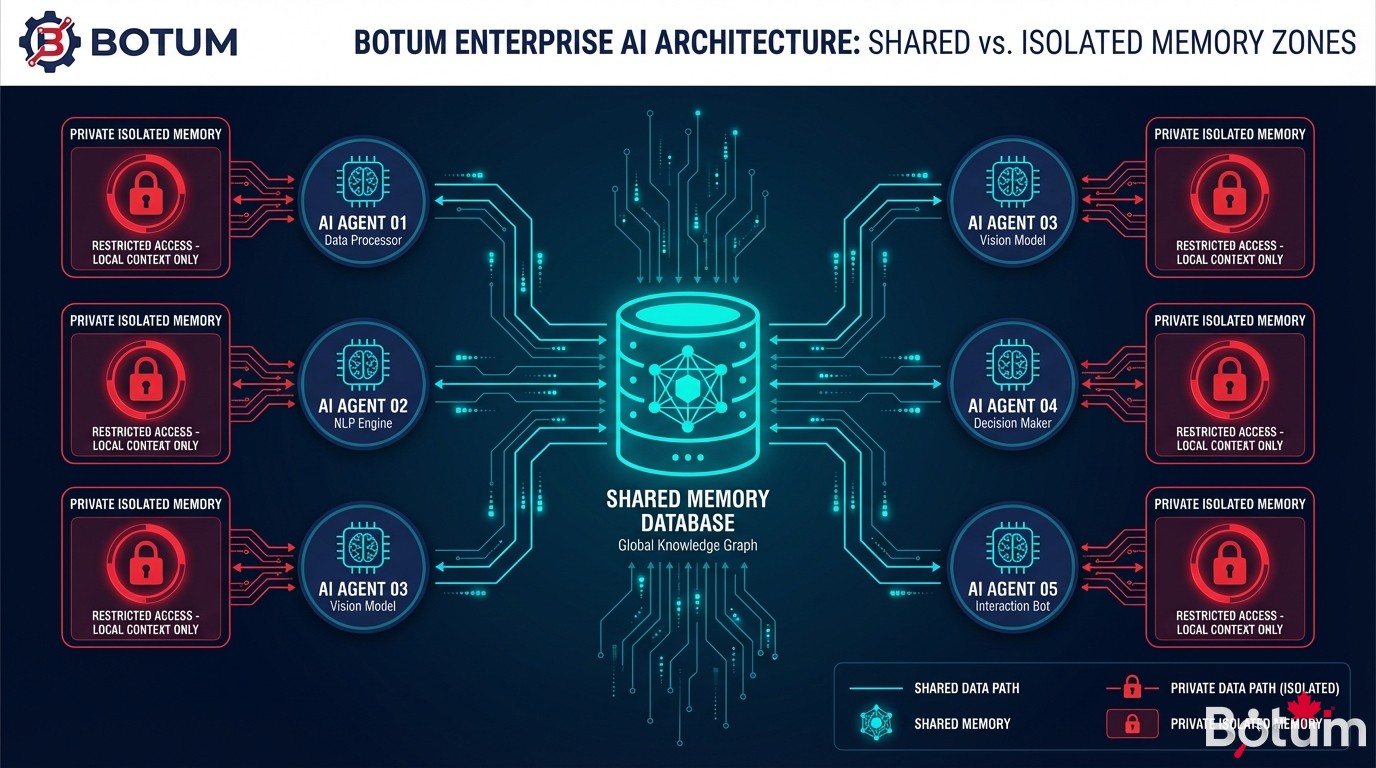
In a multi-agent network, the memory question gains an additional dimension: what information is shared between agents, and what information remains private to an agent?
Shared memory: the common workspace. Files in the workspace root directory — MEMORY.md, CODEX.md, AGENTS.md — are accessible to all agents. This is organizational memory: common rules, system state, collective decisions.
Isolated memory: agent directories. Each agent can have its own directory (agents/agent-name/) with its private notes, specific configurations, execution contexts. What stays in that directory is not automatically injected into other agents.
BOTUM's separation principle:
- Rules that apply to everyone → shared workspace (
MEMORY.md) - Domain-specific rules → the relevant agent's directory
- Execution logs → the relevant agent's daily notes, not in the common workspace
- Inter-agent artifacts (files to pass between agents) → dedicated directory (
handoffs/)
The temptation is to put everything in the shared workspace so "everything is visible." This is a mistake. A shared workspace that grows without control quickly becomes a noise source — and ends up degrading the context quality for all agents.
6. Semantic Search in Memory
Daily notes accumulate. After 6 months of production, a network of 15 agents may generate several thousand files. How do you find a decision made 3 months ago in an agent's notes?
Two levels of search are available in OpenClaw:
Text search: grep -r "keyword" memory/ or equivalent. Effective for finding exact occurrences or known identifiers (client number, service name).
Semantic search: via natural language queries on daily notes. The agent reads the most relevant files and synthesizes. This approach consumes tokens — it is reserved for important searches where precision outweighs cost.
BOTUM practices for keeping notes searchable:
- Always include explicit identifiers in notes (proper names, system identifiers, URLs)
- Structure entries with consistent headers (
## Decision,## Error,## Rule) - Maintain a monthly summary index: one page listing key decisions of the month, with dates
- For critical decisions: duplicate in
MEMORY.mdwith a reference back to the source daily note
7. At Scale: 15 Agents, 6 Months of Memory
As the network grows, memory becomes an infrastructure challenge. Here are the concrete difficulties BOTUM has encountered:
Volume: 15 agents each generating daily notes over 6 months potentially represents 2,700 files (at 1 file/agent/day). In practice, some agents are more active than others — but volume quickly exceeds human supervisory capacity.
Quality degradation: without active maintenance, MEMORY.md accumulates obsolete rules, contradictory information, references to completed projects. Memory that "grows" without curation ends up hurting as much as helping.
Inter-agent inconsistencies: when multiple agents update the shared workspace, Git conflicts and logical inconsistencies emerge. One agent may document a rule in MEMORY.md that contradicts a rule added by another agent the previous week.
BOTUM protocols at this scale:
- Dedicated memory system agent: one agent (JARVIS) is responsible for workspace maintenance. It audits
MEMORY.mdweekly, triggers compactions, resolves conflicts. - Contribution rules: only the system agent can modify
MEMORY.mddirectly. Other agents submit "memory proposals" to a staging file that JARVIS processes. - Daily note archiving: after 90 days, daily notes are archived outside the active workspace but remain accessible. Search on archives is explicitly differentiated from search on recent notes.
- Size monitoring: a daily cron measures the size of key files and alerts if
MEMORY.mdexceeds a threshold.
8. Anti-Patterns to Avoid
Teams starting with agent memory reproduce the same errors. Here are three fundamental ones:
Anti-pattern 1: Putting everything in MEMORY.md. The natural temptation is to centralize. But a 20,000-token MEMORY.md is a permanent context problem — it takes up space in every session, it is difficult to maintain, and it dilutes the relevance of important information in a volume of noise.
Anti-pattern 2: Never compacting. Daily notes accumulate indefinitely. Without periodic compaction, the archive grows, searches become expensive, and long-term memory remains trapped in the raw granularity of logs. Compaction is not optional — it is a mandatory maintenance process.
Anti-pattern 3: Confusing context and memory. The active context (what is in the current session's window) is not memory. Massively injecting files into context does not replace a well-designed memory architecture — and uselessly overloads the token window.
🚀 Go Further with BOTUM
Agent memory management is one of the most underestimated — and most critical — topics in enterprise AI deployments. BOTUM teams have developed memory protocols that survive 6 months of production and tens of thousands of exchanges. If you want to build something that lasts, let's talk.
Discuss your project →📄 Download this guide as PDF
Full version: memory protocols, compaction checklist, documented anti-patterns.
Download PDF →Conclusion
Agent memory is not a feature — it's infrastructure. It is designed, deployed, maintained. It degrades without upkeep. It scales if you anticipate its constraints.
The MEMORY.md + daily notes + periodic compaction architecture is not the only answer to the problem — but it is the one BOTUM has validated in production over 6 months and more than 50,000 agent exchanges. It is simple to understand, robust in use, and compatible with the real constraints of enterprise IT teams.
→ Post 10 coming soon: OpenClaw and databases — how to connect agents to PostgreSQL, SQLite, and structured APIs to go beyond file-based memory.

