
OpenClaw + DeepSeek: Local LLM, Open Source and Reducing API Costs
A 15-agent OpenClaw network means millions of tokens per month. BOTUM documents its hybrid strategy: local DeepSeek via Ollama for mechanical tasks, premium cloud for complex ones. Real ROI calculations, field limitations, and series conclusion.
A network of 15 active AI agents can easily generate 5 to 10 million tokens per month sent to the cloud. At ~$15/million tokens (Claude Sonnet, GPT-4), that bill quickly exceeds $100/month — for tasks that, in the majority of cases, don't require the best model on the market. The question is no longer "cloud or local?" but "how do you route intelligently?"
This post closes our 7-part series on deploying OpenClaw at BOTUM. We wanted it more exhaustive than the others: DeepSeek + Ollama + hybrid routing + real ROI calculations. It's the post we wish we had before we started.
1. The Cost Problem at Scale
When you deploy one or two agents with OpenClaw, cloud API costs remain marginal. But as the network grows — system agents, email, calendar, writing, billing, monitoring, infrastructure — token volume explodes.
At BOTUM, here's a real estimate from our 15-agent network:
- High-frequency agents (system, email, monitoring): ~300,000 tokens/day each
- Medium-frequency agents (writing, calendar, billing): ~100,000 tokens/day
- Occasional agents (monitoring, infra, recruitment): ~50,000 tokens/session
Estimated total: 6 to 8 million tokens/month. At ~$15/M tokens (Claude Sonnet 4), that's $90–120/month — over $1,000/year just in API tokens for mostly mechanical tasks.
The solution: don't send all these tasks to the most expensive model. That's where DeepSeek comes in.
2. Why DeepSeek?
DeepSeek surprised the market in 2024–2025 with performance comparable to GPT-4 on many benchmarks — for an open-source model, deployable locally, and for free. This isn't marketing: results on MMLU, HumanEval, and GSM8K place DeepSeek-V3 and DeepSeek-R1 among the best available models.
Key advantages for OpenClaw usage:
- Open-source and free — no licensing, deployable on your infra with no recurring costs
- Solid performance on structured tasks — summaries, classification, extraction, utility code generation
- Native Ollama compatibility — one config line to activate in OpenClaw
- Long context available — DeepSeek-V3 supports up to 128K tokens of context
- Multiple model sizes — from 7B (CPU-friendly) to 67B (GPU-optimized)
Where it excels: well-defined repetitive tasks, email summaries, ticket classification, structured report generation, monitoring and alerts, utility scripts.
Where it's weaker: complex multi-step reasoning, fine cultural nuances (literary translation, subtle copywriting), very long instructions with nested constraints.
3. Architecture: OpenClaw + DeepSeek via Ollama
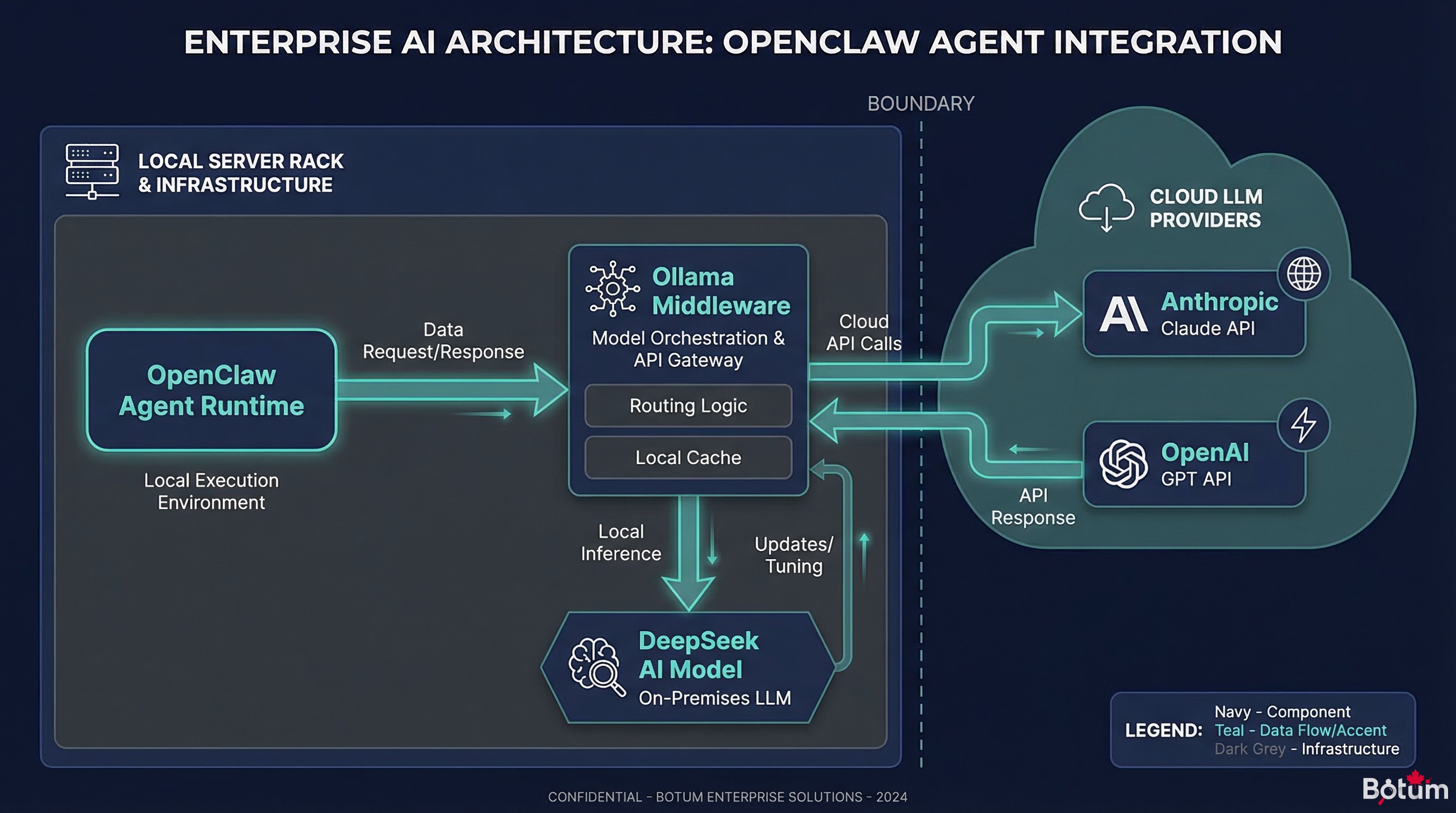
The connection between OpenClaw and a local model is made via Ollama, which exposes an OpenAI-compatible API. The configuration is straightforward.
Step 1 — Install Ollama
curl -fsSL https://ollama.ai/install.sh | sh
ollama pull deepseek-v3
# For the compact version (less RAM required):
ollama pull deepseek-r1:7b
Step 2 — Configure OpenClaw
In ~/.openclaw/openclaw.json, add an Ollama provider:
{
  "providers": {
    "ollama-local": {
      "type": "openai-compatible",
      "baseUrl": "http://localhost:11434/v1",
      "model": "deepseek-v3",
      "apiKey": "ollama"
    }
  }
}
Step 3 — Assign the Model to Specific Agents
In the agent config (e.g., system agent):
{
  "agent": "jarvis",
  "model": "ollama-local",
  "fallback_model": "anthropic/claude-sonnet-4-6"
}
Latency and Resources
| Configuration | RAM Required | Latency (~500 token response) | Recommended Use |
|---|---|---|---|
| DeepSeek 7B — CPU only | 8 GB RAM | 15–30 seconds | Non-urgent tasks, overnight batch |
| DeepSeek 7B — GPU (RTX 3060) | 8 GB VRAM | 2–4 seconds | Routine tasks, frequent agents |
| DeepSeek 67B — GPU (A100) | 40+ GB VRAM | 5–10 seconds | Complex tasks, near-cloud quality |
| Claude Sonnet (cloud) | — | 1–3 seconds | Complex tasks, critical production |
Field observation: Without a dedicated GPU, DeepSeek on CPU is too slow for high-frequency agents. With a modest GPU (RTX 3060 or equivalent), latency becomes acceptable for most mechanical tasks.
4. Hybrid Routing Strategy
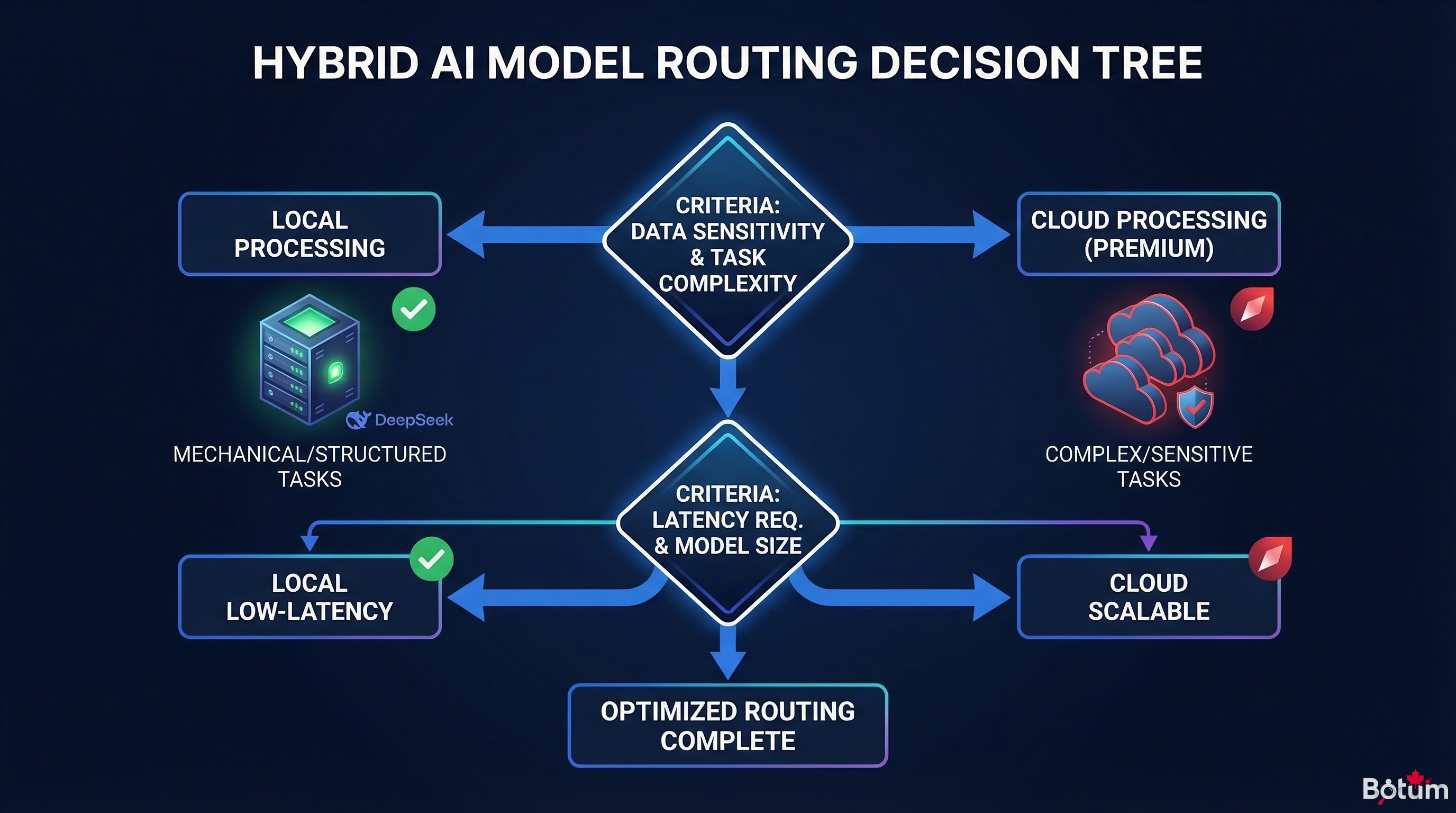
The real optimization lever isn't replacing cloud with local — it's routing each task to the most appropriate model.
The Decision Logic in 5 Questions
- Is it a structured, well-defined task? (classification, short summary, field extraction) → Local (DeepSeek)
- Is it an interactive task with the user? (direct chat reply, client email) → Lightweight cloud (Haiku, GPT-3.5)
- Does it require complex reasoning? (strategic analysis, debugging, architecture) → Premium cloud (Claude Sonnet/Opus, GPT-4)
- Is response speed critical? (<2 seconds expected) → Cloud (more predictable latency)
- Are there sensitive data involved? → Local mandatory
Implementation in OpenClaw
OpenClaw lets you define the model per agent and per task type. Here's the pattern we use:
# High-frequency / mechanical task agents → local DeepSeek
agents_local = ["jarvis", "aegis", "chronos-digest", "argus-monitoring"]

# Interactive / quality-important agents → Claude Haiku
agents_haiku = ["hermes", "nexus", "forge"]

# Complex / writing / analysis tasks → Claude Sonnet
agents_premium = ["cyrano", "career", "knox-audit"]
In practice, we configure an automatic fallback: if the local model isn't available (restart, GPU saturation), the agent automatically switches to cloud. Continuity guaranteed.
5. Real Savings — ROI Calculation
Baseline Scenario — 15-agent network, no optimization
| Model | Tokens/month | Cost/M tokens | Cost/month |
|---|---|---|---|
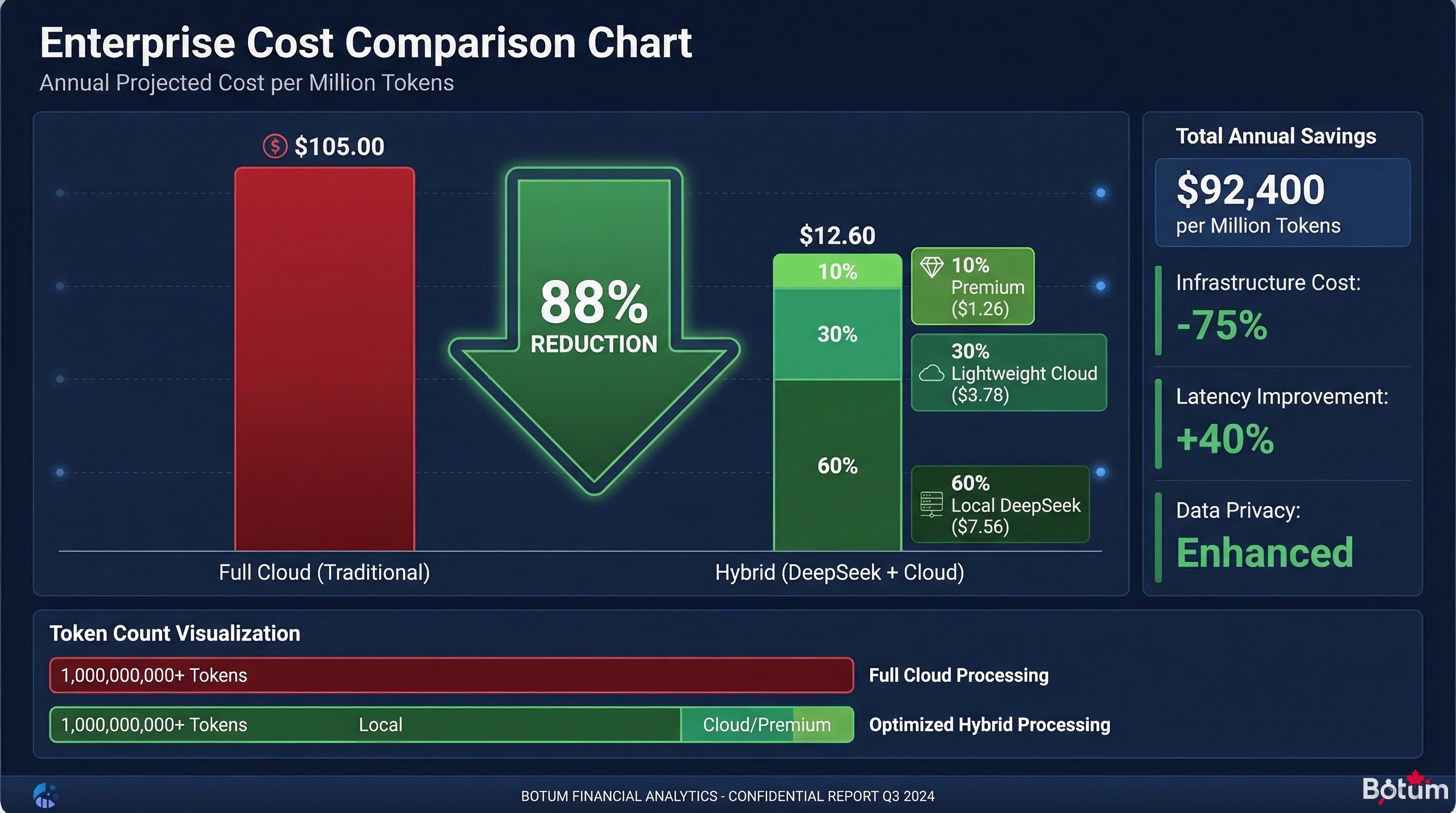
| Claude Sonnet 4 (all cloud) | 7,000,000 | $15 | $105 |
Optimized Scenario — Hybrid routing (60% local, 30% lightweight cloud, 10% premium cloud)
| Model | Tokens/month | Cost/M tokens | Cost/month |
|---|---|---|---|
| DeepSeek local (Ollama) | 4,200,000 | ~$0* | ~$0 |
| Claude Haiku (lightweight cloud) | 2,100,000 | $1 | $2.10 |
| Claude Sonnet (premium cloud) | 700,000 | $15 | $10.50 |
| OPTIMIZED TOTAL | 7,000,000 | — | ~$12.60 |
* Electricity cost estimated at ~$3–5/month for an RTX 3060 GPU in partial use.
Monthly savings: ~$92 → ~88% reduction. GPU investment break-even (RTX 3060 ≈ $450 used): approximately 5 months.
6. Known Limitations
An honest field report includes the limits. Here's what we discovered in production:
GPU Latency and Availability
The GPU is a shared resource. If multiple agents trigger simultaneous calls, requests queue up. For a 15-agent active network, a single GPU can create bottlenecks at peak hours (typically 8–10am and 2–4pm).
Mitigation: automatic fallback to cloud on saturation, or a second dedicated GPU for high-frequency agents.
Variable Quality by Task
DeepSeek 7B is noticeably inferior to Claude Sonnet on tasks requiring nuanced judgment: fine copywriting, high-value commercial emails, complex strategic analyses. We learned (sometimes the hard way) not to delegate these tasks to the local model.
Practical rule: if the task output will be read by someone outside the team, use premium cloud by default.
Long Context: Watch the Windows
DeepSeek-V3 supports 128K tokens in theory. In practice, response quality degrades significantly beyond 32K tokens on mid-size local models. For large document analysis, cloud remains more reliable.
Local Infra Maintenance
A local model is infrastructure to maintain: Ollama updates, GPU driver management, disk space (models weigh 4–40 GB), health monitoring. This maintenance cost is real — factor it into total ROI calculations.
Cases Where Cloud Remains Indispensable
- Real-time tasks (<1 second latency required)
- Very complex reasoning (reflexive agents, multi-step planning)
- Very long contexts (>50K effective tokens)
- Access to web search, advanced tools, vision (multimodal)
- During local infrastructure maintenance windows
7. BOTUM Field Report
After several months of hybrid deployment, here's what we actually use at BOTUM:
What We Do Today
- DeepSeek 7B (Ollama, RTX GPU): JARVIS (system), AEGIS (monitoring), ARGUS (RSS monitoring), automatic heartbeats
- Claude Haiku: HERMÈS (email digests), CHRONOS (calendar reminders), NEXUS (simple LinkedIn)
- Claude Sonnet 4: CYRANO (writing), KNOX (security), complex analyses, interactive sessions with Faiçal
What We'd Do Differently
- Start with routing from day one — we ran everything through cloud for 2 months before optimizing. Unnecessary cost.
- Size the GPU before deploying — CPU-only is too slow for an active network. In hindsight, a GPU is a prerequisite, not an option.
- Test DeepSeek on each task type before assigning it — we discovered its copywriting limitations in an embarrassing way. A quick benchmark avoids surprises.
- Set up automatic fallback from day one — not after the first availability incident at 2am.
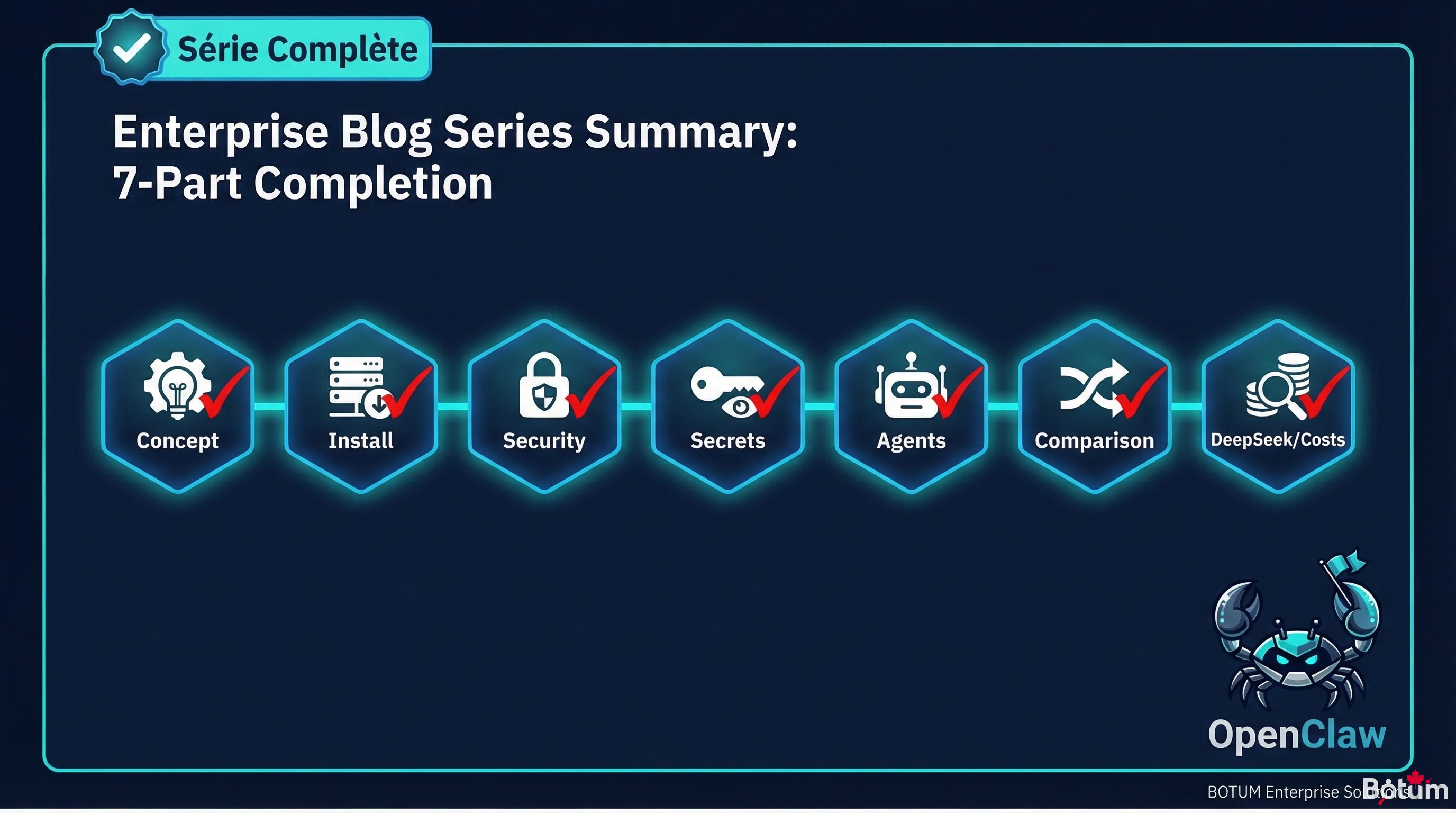
8. Series Conclusion — What We Built in 7 Posts
We started this series with a simple question: is a self-hosted AI agent network genuinely useful in business — or is it complexity for complexity's sake?
After 7 posts and several months in production, the answer is clear: yes, it's useful — but only if you approach it methodically.
Here's what this series covered:
- Post 1: The concept — OpenClaw as an agent runtime, not a chatbot
- Post 2: The installation — workspace, skills, first operational agent
- Post 3: Security — SSL, reverse proxy, vault, robust authentication
- Post 4: Secrets — credential management and AI context
- Post 5: The agents — JARVIS, HERMÈS, CHRONOS and the specialization logic
- Post 6: The comparison — OpenClaw vs ChatGPT vs Claude API, honestly
- Post 7 (this post): Cost optimization — DeepSeek, Ollama, hybrid routing
What we didn't cover (out of respect for your attention): implementation details that depend on your specific environment, tradeoffs with no universal right answer, configurations that took weeks to stabilize. That's where field expertise makes the difference.
If you're reading this series considering deploying OpenClaw: do it. Start small (one agent, one concrete use case), validate the value, then expand. The learning curve is real but manageable. And the operational gains, once the network is running smoothly, more than justify the investment.
🚀 Ready to Deploy OpenClaw in Your Organization?
This 7-part series covers the fundamentals. But going from theory to a production agent network in your environment is a different challenge.
BOTUM teams help organizations deploy enterprise AI architectures — from auditing your needs to production deployment. Every project is different. Yours too.
Talk to a BOTUM Expert →Download this guide as a PDF to read offline.
Download the guide (PDF)The Complete OpenClaw Series
- Post 1 — OpenClaw: From AI Assistant to Agent Network
- Post 2 — Installation and First Operational Agent
- Post 3 — Securing OpenClaw: SSL, Reverse Proxy, Vault
- Post 4 — Secrets, Credentials and AI Context
- Post 5 — Configuring First Agents: JARVIS, HERMÈS, CHRONOS
- Post 6 — OpenClaw vs ChatGPT vs Claude API: Honest Comparison
- Post 7 — OpenClaw + DeepSeek: Local LLM and Cost Reduction (this post)
🚀 Go Further with BOTUM
This guide covers the essentials. In production, every environment has its own specifics. BOTUM teams accompany organizations through deployment, advanced configuration, and infrastructure hardening. If you have a project, let's talk.
Discuss your project →
