
OpenClaw + Databases: PostgreSQL, RAG and Semantic Search
The OpenClaw technical series closes with database integration: PostgreSQL via psycopg2, RAG pipeline with pgvector, and semantic search on your internal data. Concrete architecture, field-tested checklist.
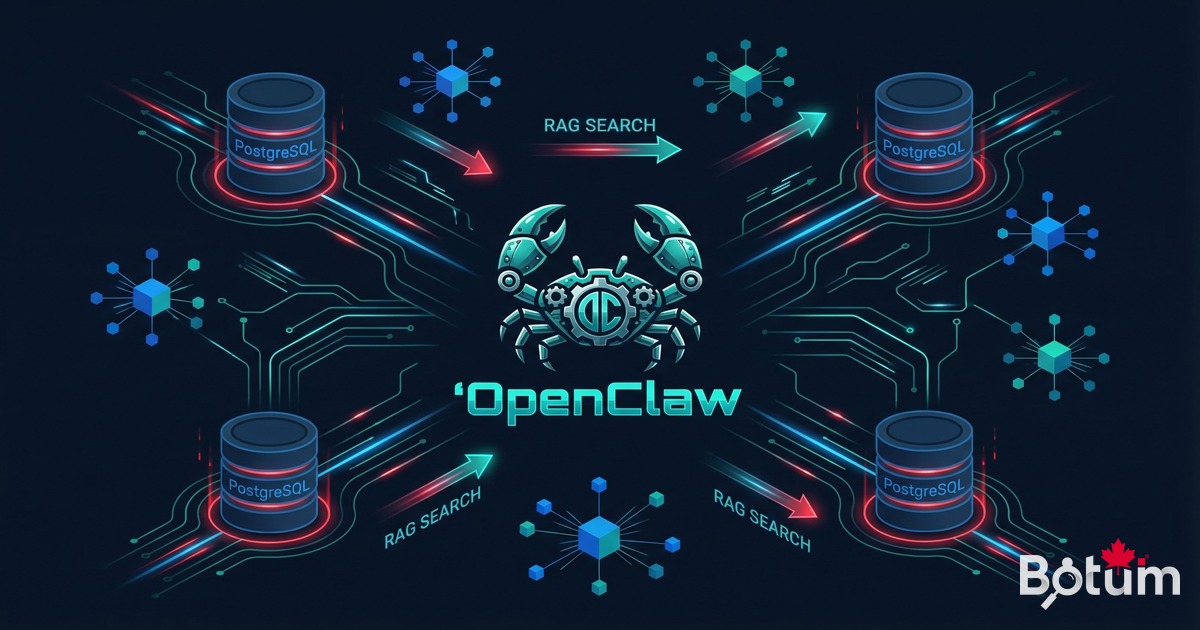
Flat files have their place. But when an agent network needs to read, write, and reason over structured data at scale — databases change the game. This post closes the OpenClaw technical series on a concrete note: PostgreSQL, RAG, and semantic search in an AI agent deployment.
1. Beyond Files: Why Connect OpenClaw to a Real Database
An OpenClaw agent can read and write Markdown, JSON, CSV files. For many use cases, that's sufficient. The Git workspace as a persistence layer covers 80% of common automation scenarios: logs, notes, configurations, inter-session state.
But certain situations demand more:
- Large volumes — a history of 50,000 transactions isn't reasonably readable as Markdown.
- Dynamic queries — filtering clients by revenue, date, or status: SQL is the right tool, not grep.
- Concurrency — multiple agents writing to the same file simultaneously create race conditions. A database handles this natively.
- Semantic search — finding documents by meaning, not exact keyword: that requires a vector store, not a text file.
According to a Gartner 2025 study, 61% of production AI agent deployments need a structured persistence layer within the first 6 months of operation. Database integration isn't an advanced option — it's the natural next step.
2. PostgreSQL + OpenClaw: Direct Connection via Scripts
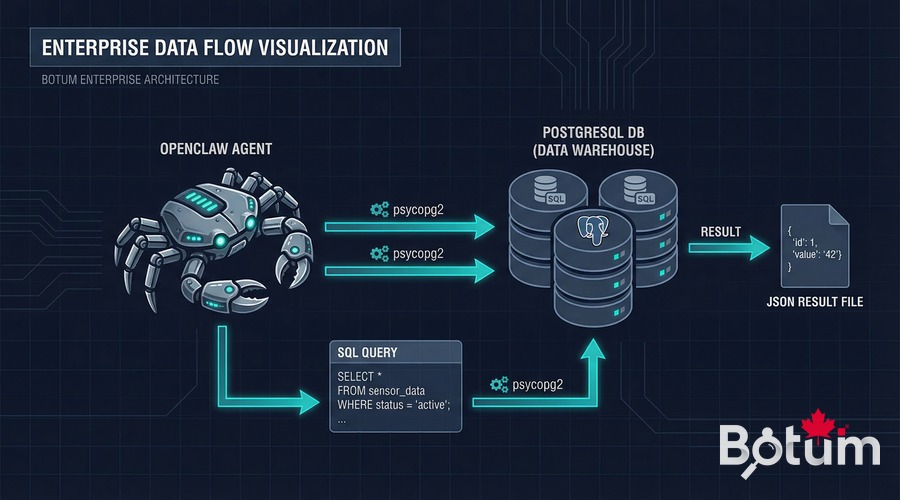
The most direct integration: a Python script in the agent's workspace. The agent runs the script via its exec skill, the script connects to PostgreSQL via psycopg2, performs operations, and returns results in a JSON file that the agent then reads.
Typical architecture:
Agent → exec(scripts/query_db.py --action timesheet --user BOTUM)
         ↓
scripts/query_db.py → psycopg2 → PostgreSQL
         ↓
data/query-result.json → Agent reads → processes → responds
Connection example in an agent script:
import psycopg2, json, os

conn = psycopg2.connect(
    host=os.environ['PG_HOST'],
    dbname=os.environ['PG_DB'],
    user=os.environ['PG_USER'],
    password=os.environ['PG_PASS']
)
cur = conn.cursor()
cur.execute(
    "SELECT client, SUM(hours) as total "
    "FROM timesheets WHERE month=%s "
    "GROUP BY client ORDER BY total DESC",
    ('2026-03',))

results = [{'client': r[0], 'hours': float(r[1])} for r in cur.fetchall()]
with open('data/timesheet-result.json', 'w') as f:
    json.dump(results, f, ensure_ascii=False, indent=2)

conn.close()
print(f"Results written: {len(results)} clients")
Absolute security rule: PostgreSQL credentials never live in the Git workspace. They transit via environment variables injected by the vault at agent startup — the same principle as for any credential in OpenClaw (see Post 4 of this series).
3. Concrete Use Cases
Automated Timesheets
BOTUM's LEDGER agent runs a script every Friday that aggregates timesheet entries from PostgreSQL, generates a Markdown report, and sends it as a digest. The result: zero human intervention for weekly reports.
CRM Updated by an Agent
After each client call logged in messaging, the NEXUS agent extracts key information (decision made, next step, contact persona) and inserts/updates the corresponding row in the PostgreSQL contacts table. The CRM stays current in real time, without manual data entry.
Structured Operation Logs
Every significant agent action (email sent, report generated, alert triggered) is logged in an agent_logs table with timestamp, source agent, action type, and status. This enables full auditing and operational dashboards — impossible to do reliably with text files.
4. RAG (Retrieval-Augmented Generation): Why It Changes Everything
An LLM has a limited context window. You can't inject 10,000 pages of documentation, a CRM's complete history, or 5 years of technical decisions. RAG solves this problem.
The principle: rather than injecting all content into the prompt, you retrieve only the most relevant passages for the question asked, and inject those. Relevance is calculated not by exact keyword matching, but by semantic similarity — closeness of meaning in vector space.
Simple RAG pipeline architecture:
1. Indexing (once)
   Documents → Embeddings (1536-dim vectors) → Storage (pgvector or file)

2. Query (each question)
   Question → Embedding → Similarity search → Top-K passages → LLM context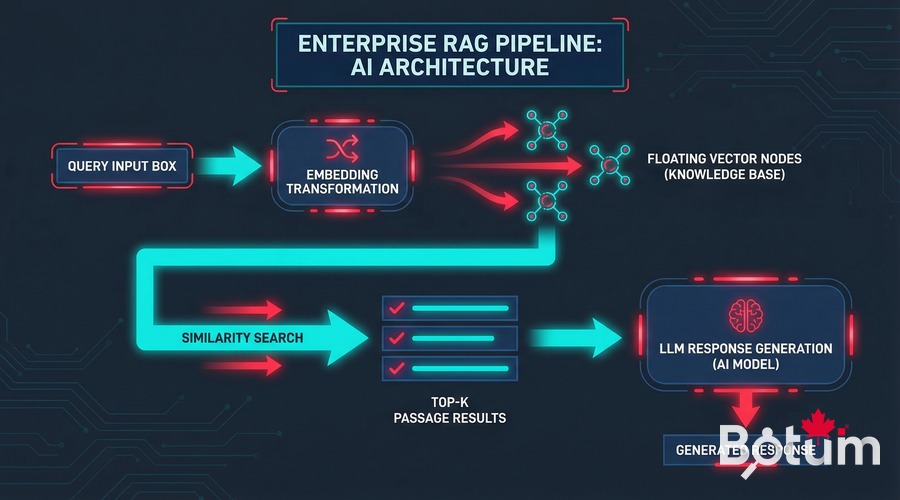
5. Implementing a Basic RAG with OpenClaw
Step 1: Generate Embeddings
An embedding is a dense vector representation of text — an array of 1536 numbers that captures the "meaning" of the text. Semantically similar texts have close vectors in this space.
import openai, json, numpy as np

client = openai.OpenAI()

def get_embedding(text: str) -> list[float]:
    response = client.embeddings.create(
        model="text-embedding-3-small",
        input=text
    )
    return response.data[0].embedding

# Index documents
documents = [
    {"id": "doc1", "content": "Architecture decision: PostgreSQL for the CRM..."},
    {"id": "doc2", "content": "March 12 meeting: migration planned for Q3..."},
]

for doc in documents:
    doc["embedding"] = get_embedding(doc["content"])

# Save (simple approach: JSON file)
with open("data/embeddings.json", "w") as f:
    json.dump(documents, f)
Step 2: pgvector for Vector Storage (Recommended in Production)
For small volumes (< 10,000 documents), a JSON file with cosine search in Python is sufficient. For production, PostgreSQL's pgvector extension is the natural solution if you're already on Postgres.
-- Install pgvector
CREATE EXTENSION IF NOT EXISTS vector;

-- Documents table
CREATE TABLE documents (
    id SERIAL PRIMARY KEY,
    content TEXT NOT NULL,
    source VARCHAR(200),
    embedding vector(1536)
);

-- Index for fast search (HNSW recommended)
CREATE INDEX ON documents USING hnsw (embedding vector_cosine_ops);

-- Similarity query
SELECT content, source,
       1 - (embedding <=> %s::vector) AS similarity
FROM documents
ORDER BY embedding <=> %s::vector
LIMIT 5;
Step 3: Complete Pipeline in an Agent Script
def rag_query(question: str, top_k: int = 5) -> str:
    # Returns relevant context for a question.
    q_embedding = get_embedding(question)

    # Search in pgvector
    cur.execute(
        "SELECT content, source, "
        "1-(embedding <=> %s::vector) AS score "
        "FROM documents "
        "ORDER BY embedding <=> %s::vector LIMIT %s",
        (q_embedding, q_embedding, top_k))

    passages = cur.fetchall()
    context = "

---

".join([
        f"Source: {p[1]} (score: {p[2]:.2f})
{p[0]}"
        for p in passages if p[2] > 0.7  # relevance threshold
    ])
    return context
6. Semantic Search on Your Data
Semantic search is the immediate consequence of an operational RAG pipeline. Instead of searching for "PostgreSQL" in your notes, you search for "database architecture decisions" — and find relevant passages even if they don't contain the exact word.
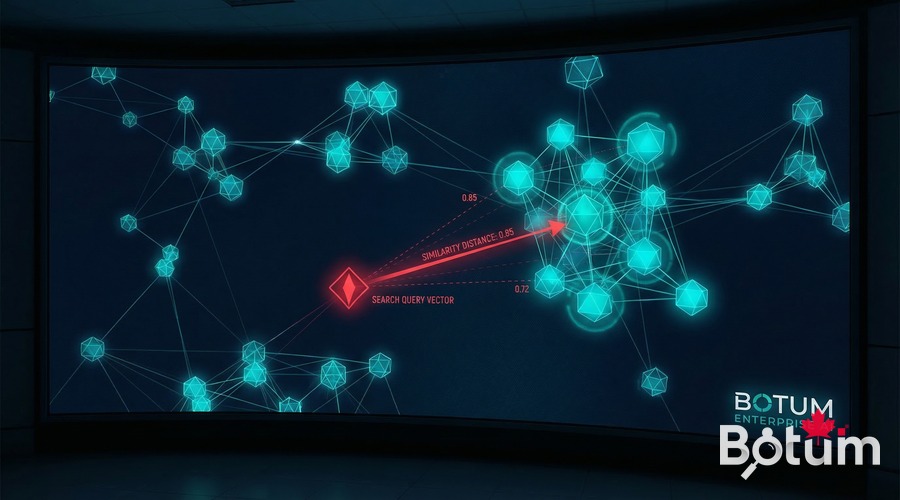
Concrete use cases at BOTUM:
- Retrieve past decisions — "What was the decision on backup architecture?" → the agent finds the exact passage in meeting notes, even from 8 months ago.
- Find similar posts — before publishing a post, check if we've already covered this topic from another angle. Semantic search catches duplicates that keyword search misses.
- Search a CRM — "Which clients mentioned security concerns?" → semantic scan of contact notes, not exact search.
- Internal knowledge base — agents find the applicable standard procedure for a situation, even if formulated differently.
7. Limits and Ground Truth
RAG is not a magic wand. BOTUM teams have identified several concrete limitations:
Embedding Quality
Poor input text produces poor embeddings. If your meeting notes are cryptic bullet points ("Migration — final decision — see Slack"), the embedding captures very little. The quality of the indexing corpus determines the quality of results.
Embedding Costs
With text-embedding-3-small (OpenAI), the cost is $0.02 per 1 million tokens. For a corpus of 10,000 documents at 500 tokens each: ~$0.10 for initial indexing. Reasonable — but it accumulates if you re-index too frequently.
Latency
A RAG pipeline adds 200-500ms per query (embedding API call + vector search). For an interactive agent, this is often invisible. For a batch pipeline of 1,000 queries, it matters.
When RAG Is Unnecessary
If your data fits in less than 50,000 tokens (roughly 150 pages), inject it directly into context. Claude 3.5 Sonnet handles 200,000 context tokens. RAG introduces complexity that isn't always justified.
8. Recommended Architecture: When to Use What
| Situation | Recommended Solution | Why |
|---|---|---|
| Data < 50K tokens, static | Direct injection in context | Zero latency, zero complexity |
| Structured data, filtered queries | PostgreSQL direct via psycopg2 | SQL > grep, concurrency managed |
| < 10K docs, proto/dev | JSON + cosine in Python | Simple, no dependencies |
| 10K-1M docs, already on Postgres | pgvector | Natural integration, performant |
| > 1M docs, multi-tenant | Qdrant, Weaviate, Pinecone | Dedicated vector stores, scalable |
| Agent operation logs | PostgreSQL (agent_logs table) | Audit, dashboards, ad hoc queries |
9. DB Integration Checklist
- ✅ Credentials via vault only — never in the Git workspace, never hardcoded in scripts
- ✅ Dedicated PostgreSQL user per agent — minimal rights (SELECT/INSERT/UPDATE on required tables only)
- ✅ Connection pooling — don't open a new connection per query in production (use pgBouncer or application pool)
- ✅ Query timeouts — always set a statement_timeout; an agent should never block indefinitely
- ✅ Parameterized queries only — never f-strings in a SELECT; SQL injection risk even from an agent
- ✅ Results written to data/ — agent reads results from a file, not directly from the DB connection
- ✅ Index on frequent columns — the agent shouldn't launch full scans on 100K-row tables
- ✅ RAG similarity threshold — always filter results with a minimum score (> 0.65–0.7); irrelevant results are worse than nothing
- ✅ Scheduled re-indexing, not real-time — re-index embeddings in batch (night, weekend), not on every write
- ✅ Regression testing — after each corpus change, verify reference queries still return the right passages
10. Series Conclusion
This tenth post marks the end of the OpenClaw technical series on blog.botum.ca. Across ten episodes, BOTUM documented a real deployment — from initial installation through database integration and semantic search.
A recap of the trajectory:
- B1-B2 — The concept, installation, first operational agent
- B3-B4 — Production security: auth, SSL, vault, secrets management in AI context
- B5 — Specialized agent network: identities, roles, inter-agent communication
- B6-B7 — LLM selection: honest comparison, DeepSeek and open-source local models
- B8-B9 — Advanced automation: crons, triggers, task queues, long-term memory
- B10 — Structured persistence: PostgreSQL, RAG, semantic search
The next series will explore business and strategic dimensions: ROI metrics, SMB vs Enterprise architectures, and edge deployments. These articles will appear in the Insights section of botum.ca.
🚀 Ready to Connect Your AI Infrastructure to Your Data?
You now have all 10 pillars of an enterprise OpenClaw deployment. But between reading a guide and deploying in production lies real architecture, integration decisions, and pitfalls that no documentation covers.
BOTUM teams accompany organizations from technical audit to production deployment. Every project is unique — yours too.
Talk to a BOTUM Expert →📄 Download This Guide as PDF
Complete version of this post: PostgreSQL, RAG and Semantic Search with OpenClaw — PDF format optimized for reading and sharing.
Download PDF →Complete Index — OpenClaw Series B1–B10
- B1 — OpenClaw: From AI Assistant to Agent Network — A Field Report
- B2 — Installing OpenClaw: Workspace, Messaging, First Operational Agent
- B3 — Securing OpenClaw in Production: Auth, SSL, Reverse Proxy and Vault
- B4 — Secrets and Credentials in AI Context — Never Expose Them
- B5 — Configuring First Agents: JARVIS, HERMÈS, CHRONOS
- B6 — OpenClaw vs ChatGPT vs Claude API — An Honest Comparison
- B7 — OpenClaw + DeepSeek: Local LLM, Open-Source and API Cost Reduction
- B8 — Automating Operations: Crons, Triggers, Task Queues and Escalations
- B9 — Memory and Context: MEMORY.md, Compactions and Long-Term at Scale
- B10 — OpenClaw + Databases: PostgreSQL, RAG and Semantic Search ← you are here
🚀 Go Further with BOTUM
This guide covers the essentials. In production, every environment has its own specifics. BOTUM teams accompany organizations through deployment, advanced configuration, and infrastructure hardening. If you have a project, let's talk.
Discuss your project →
