On-Prem to Cloud Migration: What Nobody Tells You Before You Start
Cloud migration without preparation is the fastest way to blow your budget. Field guide: fatal mistakes, Rehost/Replatform/Refactor models, Azure vs AWS vs GCP for Canadian SMBs, 5-step plan.

Cloud Journey Series · Post B11
The Cloud Promise… and the Reality
The CEO walks into the boardroom with boundless energy. "We're migrating everything to the cloud in 6 months. We'll cut costs, accelerate deployments, and finally become agile." Applause in the room. General enthusiasm.
Nine months later, the infrastructure bill has tripled. The three best developers have resigned — exhausted by a chaotic migration running in parallel with their usual responsibilities. And the main application, hastily migrated as a "Lift & Shift," is consuming 40 oversized EC2 instances with 60% of resources sitting idle.
We've lived this story. Not once. Multiple times. And every time, the root cause is the same: a cloud migration without adequate preparation.
This guide distills what we learn in the field. Not vendor theory. The reality of Canadian SMBs.
The Reference Framework: The 6 R's of Cloud Migration
Before diving into mistakes and strategies, let's establish the baseline vocabulary. Amazon Web Services popularized the 6 R's of Migration framework — now adopted across the industry and sometimes extended to 7, 8, or 9 R's depending on the source.
| Strategy | Description | Best for |
|---|---|---|
| Rehost (Lift & Shift) | Direct migration without modification | Tight deadline, stable legacy app |
| Replatform | Migration with targeted optimizations | SMBs, best effort/benefit ratio |
| Repurchase | Replace with equivalent SaaS | CRM, ERP, email (e.g. Salesforce, M365) |
| Refactor (Re-architect) | Full cloud-native redesign | Strategic apps, critical scalability |
| Retire | Decommission unused applications | Often 10-20% of the application portfolio |
| Retain | Keep on-prem temporarily | Apps not yet ready, regulatory constraints |
Note: Some frameworks add a 7th R — Relocate (move to managed cloud infrastructure, e.g. VMware Cloud on AWS) — useful when migrating an existing VMware environment without application redesign.
This framework gives the entire organization a common language. Before classifying each workload, it's the first conversation to have with your team.
This guide focuses in depth on the 3 most common strategies for SMB/mid-market contexts: Rehost, Replatform, and Refactor. For a complete view of AWS's 6 Well-Architected Framework pillars or the Cloud Adoption Framework (CAF), refer to the official AWS, Azure, or GCP documentation.
The 3 Fatal Mistakes of a Cloud Migration
1. Blind Lift & Shift
The most common mistake: take each on-prem server and recreate it as-is in the cloud. Result? You pay for cloud, but you have all the drawbacks of on-prem — without any of the native benefits.
A client had 40 on-prem servers. The team migrated them one by one to EC2, keeping the same specs. Six months later: 40 EC2 instances running 24/7, most of them below 20% CPU utilization. 60% of resources wasted. Monthly bill: double the planned budget.
The problem wasn't the cloud. It was the absence of prior analysis: which apps are cloud-ready? Which ones can be containerized? Which ones deserve to be refactored?
2. Underestimating Real Costs
The industry benchmark is brutal: plan for 1.4x your initial estimate. Why? Because visible costs (compute, storage) represent only half the actual bill.
Hidden costs accumulate silently:
- Network egress: 0.08–0.09 USD/GB to transfer your data out of the cloud
- Enterprise support: 10%+ of your monthly bill if you opt for business-critical support
- BYOL licenses: Windows Server, SQL Server — on-prem licenses don't automatically transfer
- Team training: 15,000–25,000 CAD to properly train a team of 3-4 on cloud best practices
- Idle resources: one instance left running by mistake = 130 USD/month minimum
3. Ignoring Technical Debt
Migrating an application with 10 years of technical debt means transplanting it with its problems. Worse: cloud amplifies certain inefficiencies (query costs, inter-service network latency, etc.).
Before migrating, do an honest inventory: which apps are a risk? What is their criticality? Can they be modernized simultaneously, or should they be planned separately?
The 3 Migration Models: Choosing the Right One
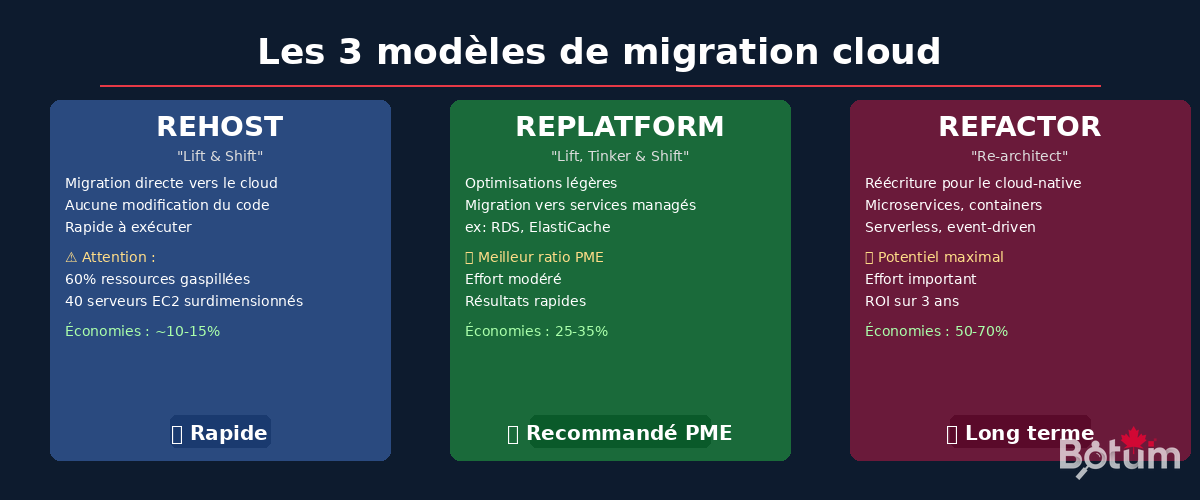
Rehost (Lift & Shift)
Principle: Direct migration, no modification. VMs are moved as-is to the cloud.
Advantages: Fast to execute, low technical risk, useful for emergency migrations or datacenter lease endings.
Disadvantages: No cloud-native benefits, near-systematic over-sizing, high long-term costs.
When to use it: Legacy apps with strong regulatory constraints, imminent deadline, or as a first step before a planned refactoring.
Estimated savings: 10–15% compared to on-prem (mainly on capex elimination).
Replatform (Lift, Tinker & Shift)
Principle: Migration with light optimizations. Use cloud managed services without rewriting application code.
Concrete examples: Replace self-hosted MySQL with Amazon RDS or Azure Database for MySQL. Replace on-prem Redis with ElastiCache or Azure Cache for Redis. Move static files to S3 or Azure Blob Storage.
Why it's the best ratio for SMBs: Moderate effort (2-3 months), quick results, 25–35% savings on infrastructure costs, and a team that progressively builds competence.
This is the model we recommend in 80% of cases for Canadian SMBs.
Refactor (Re-architect)
Principle: Rewriting the application to fully leverage cloud-native capabilities: microservices, containers, serverless, event-driven architecture.
Advantages: 50–70% savings over 3 years, automatic scalability, maximum resilience, accelerated innovation.
Reality: Significant effort (6–18 months), high technical risk, requires advanced cloud skills. Reserve for strategic high-traffic applications.
Plan only for the 20% of applications that justify the investment.
Azure vs AWS vs GCP: Which Cloud for Your Canadian SMB?
The short answer: it depends on your current stack. The long answer:
Microsoft Azure
Recommended if: your organization is Microsoft-heavy (Office 365, Active Directory, SQL Server, .NET).
- Canadian regions: Canada Central (Toronto) and Canada East (Quebec City)
- Native integration with Active Directory and Microsoft 365
- Excellent compliance: PIPEDA, SOC 2, ISO 27001
- Azure Hybrid Benefit: savings on existing Windows/SQL Server licenses
Amazon Web Services (AWS)
Recommended if: you want the broadest catalog and maximum maturity.
- Canadian region: ca-central-1 (Montreal) + ca-west-1 (Calgary) announced
- Largest managed services catalog (200+ services)
- Largest partner ecosystem
- Reserved Instances: 40–60% savings vs on-demand
Google Cloud Platform (GCP)
Recommended if: data analytics, machine learning, or native Kubernetes.
- Canadian regions: northamerica-northeast1 (Montreal) + northamerica-northeast2 (Toronto)
- BigQuery for large-scale analytics
- GKE: the best managed Kubernetes on the market
- Automatic Sustained Use Discounts (no need to reserve in advance)
The 5-Step Plan
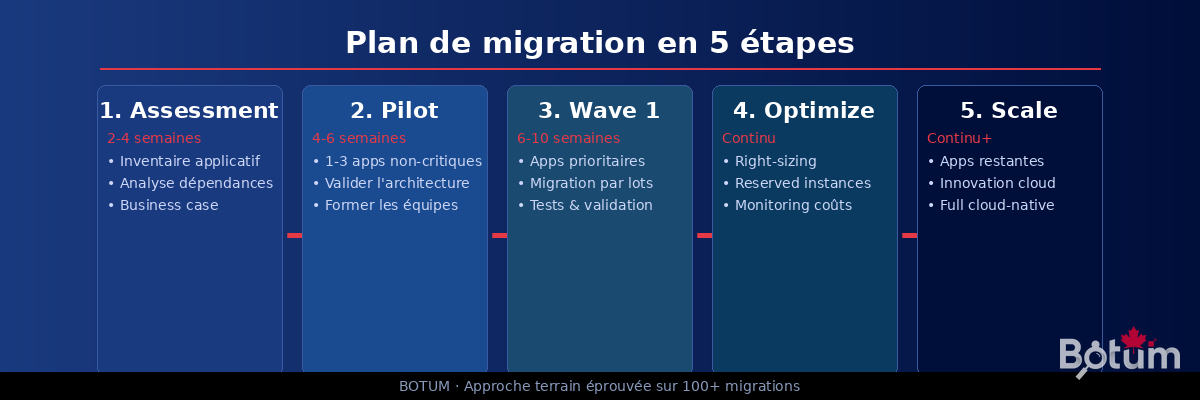
Step 1 — Assessment (2–4 weeks)
Complete inventory of your application portfolio. For each app: criticality, dependencies, architecture, technical debt, current costs. Build the migration business case with a comparative 3-year TCO.
Deliverable: application matrix with recommended migration strategy (Rehost / Replatform / Refactor / Retire / Retain).
Step 2 — Pilot (4–6 weeks)
Migrate 1 to 3 non-critical applications. The goal isn't performance, it's learning: validate the target architecture, identify friction points, train teams in real conditions.
Deliverable: validated migration runbook, reference architecture, actual vs. estimated costs.
Step 3 — Wave 1 (6–10 weeks)
Migration of priority applications: those with the best effort/benefit ratio. Proceed in batches of 5-10 apps. Each batch = regression tests + business validation before traffic cutover.
Deliverable: 40-60% of portfolio migrated, cloud vs. on-prem performance KPIs.
Step 4 — Optimize (ongoing)
Migration isn't the end, it's the beginning. Right-sizing instances (actual CPU/RAM usage), activating Reserved Instances or Savings Plans, implementing FinOps: budgets, alerts, cost dashboards.
Deliverable: additional 20-30% reduction on the initial cloud bill.
Step 5 — Scale
Migration of remaining applications with lessons learned. Exploration of cloud-native services for new projects. Transition to a cloud-first culture in development teams.
Hidden Costs: What Nobody Tells You
Here are the budget items systematically omitted from cloud quotes:
- Network egress: Azure, AWS, and GCP charge 0.08–0.09 USD/GB to transfer your data outbound. For a system with 10 TB/month outbound transfer = 800–900 USD/month extra.
- Enterprise support: Business or Enterprise support represents 10%+ of your monthly bill. On 50,000 USD/month of cloud, that's 5,000–8,000 USD/month just for support.
- BYOL licenses: Windows Server and SQL Server in BYOL (Bring Your Own License) require rigorous verification of your usage rights. Some on-prem licenses don't transfer.
- Training: AWS Solutions Architect, Azure Administrator, or Google Cloud Professional certifications — budget 15,000–25,000 CAD to properly train a team of 3-4 people.
- Idle resources: A single EC2 m5.xlarge instance left running = 130 USD/month. Multiply by 20 forgotten resources = 2,600 USD/month wasted. It happens. Often.
BOTUM Case Study: −40% Costs in 90 Days
A mid-size client — services sector, 120 on-prem VMs, aging infrastructure, datacenter lease expiring in 8 months — engaged us for a complete cloud migration.
Assessment (3 weeks): Inventory of 120 VMs. Result: 45% of apps are Replatform-ready, 35% require Rehost as a first phase then Replatform, 20% are Refactor candidates for Phase 2. 15 VMs were to be decommissioned (abandoned apps still running).
Chosen strategy: 80% Replatform (databases to managed services, web apps to managed containers), 20% Refactor for the 3 high-traffic apps.
Execution: Migration in 4 waves over 10 weeks. At each wave, immediate right-sizing and activation of 1-year Reserved Instances for identified stable workloads.
Results at 90 days:
- Infrastructure costs: −40% vs. on-prem (including datacenter lease amortization)
- Availability: 99.97% vs. 99.2% on-prem (hardware-related incidents eliminated)
- Deployment time: from 4 hours to 12 minutes (native cloud CI/CD)
- 15 VMs decommissioned = immediate savings of 3,200 USD/month
The most effective migration isn't necessarily the fastest. It's the one that's prepared.
Conclusion
Migrating to the cloud is a strategic decision, not a technical one. It starts with an honest assessment of your application portfolio, a rigorous business case, and a clear strategy per application.
The Replatform model offers the best risk/benefit ratio for most SMBs. Refactor, when justified, truly transforms organizations. Pure Lift & Shift is rarely the right answer — except as a planned transitional step.
And above all: budget 1.4x your estimate. Train your teams. Activate FinOps from day one. Cloud savings aren't automatic — they're built.
Download this guide as PDF to read offline.
⬇ Download the guide (PDF)🚀 Go Further with BOTUM
This guide covers the essentials. In production, every migration has its own specifics. BOTUM teams help organizations assess, plan, and execute cloud migrations. If you have a project, let's talk.
Discuss your project →