
Multi-Cloud Strategy for SMBs: Avoid Vendor Lock-In Without Overcomplicating Things
70% of enterprises use 2+ clouds — often without having decided to. Pragmatic guide for SMB CTOs: intentional vs. accidental multi-cloud, Terraform, Kubernetes, federated identity, and how BOTUM reduced cloud costs by 28%.
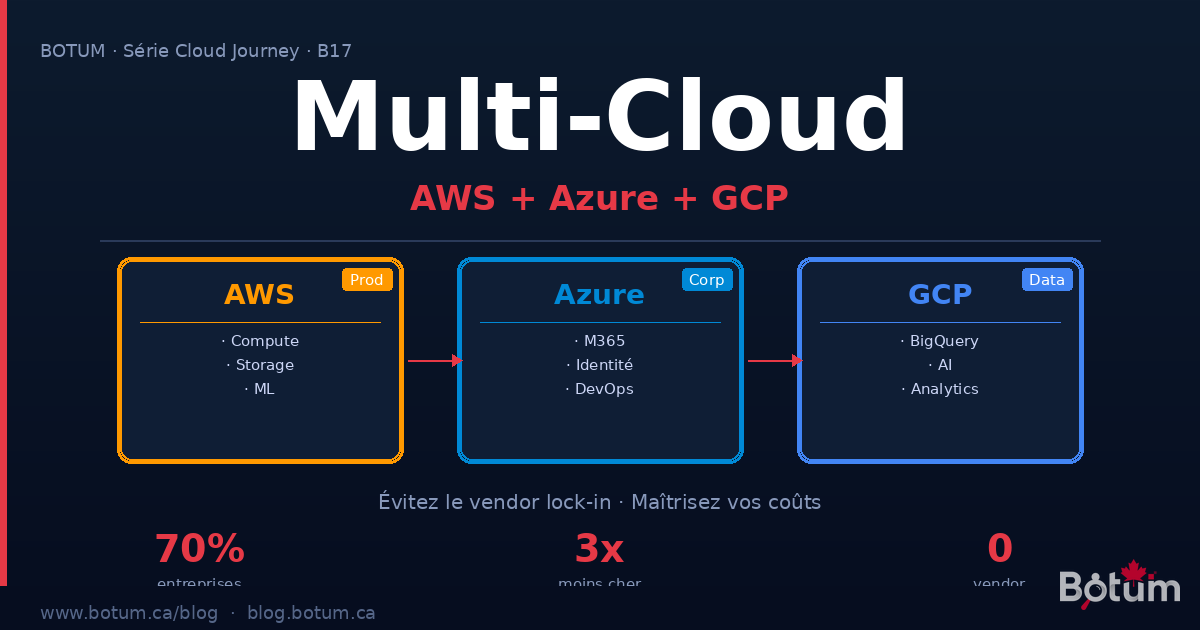
According to the Flexera State of the Cloud 2024 report, 70% of enterprises now use two or more public clouds. Among SMBs, this figure is often the result of organic accumulation rather than strategic decision-making: a critical SaaS running on AWS, Azure infrastructure because you use M365, a GCP pilot project for AI. Welcome to multi-cloud reality.
This post is not an argument for multi-cloud at any cost. It's a pragmatic guide for CTOs and DevOps at SMBs who find themselves in this situation — intentionally or not — and want to make the most of it without drowning in complexity.
Why SMBs End Up Multi-Cloud Without Deciding To
The truth is that most SMBs become multi-cloud by accident, through the accumulation of tactical decisions made in isolation:
- SaaS integration: Your Salesforce CRM runs on AWS. Your Teams collaboration tool is on Azure. Your data warehouse is on GCP via BigQuery. Each decision was logical in isolation — together, you're multi-cloud.
- Historical legacy: The company migrated its infrastructure to Azure 3 years ago because it used Windows Server and Active Directory. Then the CTO launched an ML project on AWS SageMaker because "that's where the best models are." There you go.
- Acquisitions: You acquire a startup whose entire infrastructure is on GCP. Migrating to your Azure stack would take 18 months. In the meantime, you manage both.
- Pilot projects that stay: "We're just testing GCP for this AI project" — two years later, the AI project is in production and no one wants to migrate it.
This accidental multi-cloud isn't necessarily bad — but it's risky if you don't recognize it and manage it actively.
Intentional vs. Accidental Multi-Cloud: The Differences That Matter
The distinction is fundamental. Accidental multi-cloud is characterized by the absence of central governance, teams that don't know what's running where, costs that are difficult to attribute, identities managed in silos within each provider, and fragmented security. That's where breaches happen.
Intentional multi-cloud, by contrast, rests on a clear strategy: each cloud is chosen for what it does best, an abstraction layer unifies management, identities are federated, and costs are visible and controlled. That's the difference between enduring and choosing.
Moving from accidental to intentional doesn't necessarily mean migrating everything. It requires an honest inventory of what you have and a conscious decision about what you want to keep.
The Real Benefits of Multi-Cloud (When It's Intentional)
Resilience and availability: A major AWS incident (like the us-east-1 outage in December 2021 that impacted Netflix, Spotify, and Disney+) shouldn't bring your business to a halt. With a multi-cloud architecture, you can redirect traffic to Azure or GCP during the outage. It takes preparation, but it's achievable.
Price negotiation leverage: Cloud providers know you're captive if you're mono-cloud. By demonstrating your ability to move workloads, you have real leverage during enterprise contract renewals. Several SMBs obtain 20-30% discounts simply by credibly threatening to migrate.
Best service per use case: AWS dominates compute and storage (S3 remains the reference). Azure is unbeatable for everything touching the Microsoft ecosystem (Entra ID, M365, Teams). GCP leads on massive analytics (BigQuery) and AI (Vertex AI, Gemini). Using the best tool for each job is good engineering sense.
Compliance and data sovereignty: Some data must remain in Canada (PIPEDA, PHIPA regulations). Having multiple options allows you to choose the provider that offers the best data residency guarantees for each type of data.
The Real Challenges of Multi-Cloud (No Sugar-Coating)
Multi-cloud has real costs that must be confronted before diving in:
Operational complexity: Managing three different consoles, three CLIs (aws, az, gcloud), three distinct IAM models, three billing systems — this is real overhead. A team of 3 DevOps engineers can easily spend 40% of their time on this without the right tools.
Training costs: AWS, Azure, and GCP certifications are all different. Training an engineer on all three stacks represents 6 to 12 months of investment. Underestimate this cost and you'll end up with "it works I don't really know why" code across three different clouds.
Inter-cloud egress fees: This is THE number one trap. Transferring data from AWS to Azure or GCP costs between 8 and 9 cents per gigabyte. For an SMB transferring 10 TB per month between two clouds, that's $800 to $900 USD per month — just for transfers. Design your architectures to minimize inter-cloud flows.
Unified security: Each cloud has its own IAM model. AWS IAM, Azure Entra ID (formerly Azure AD), GCP Cloud IAM — three syntaxes, three different access logics. Without a federated identity layer, you're managing three separate access systems, with the risk of visibility "gaps" between them.
Practical Strategies for Controlled Multi-Cloud
1. The Abstraction Layer: Terraform and Pulumi
The golden rule: never use cloud consoles directly to create infrastructure. Everything goes through code (IaC — Infrastructure as Code). Terraform and Pulumi are the two indispensable tools:
- Terraform (HashiCorp): the industry standard. Providers for AWS, Azure, GCP, and 1000+ others. HCL as a language, state file to track actual state. Reusable modules to standardize your infrastructure patterns across clouds. Terraform Cloud or Atlantis for CI/CD execution.
- Pulumi: same concept but with real programming languages (TypeScript, Python, Go). Ideal if your team prefers coding in Python rather than learning HCL. Particularly powerful for complex architectures with a lot of conditional logic.
IaC abstraction gives you a key advantage: your infrastructure is versionable, auditable, and reproducible. If one cloud fails, you can re-provision in another by changing a few provider variables.
2. Multi-Cluster Kubernetes
Kubernetes is the universal multi-cloud runtime. An EKS cluster on AWS, an AKS on Azure, a GKE on GCP — your containerized applications run identically on all three. The strategy:
- Fleet management: Google Anthos or Rancher to manage multiple clusters from a unified interface. Azure Arc extends Azure management to any Kubernetes cluster, including on-premises and other clouds.
- Crossplane: provision cloud resources (S3 buckets, RDS databases) via Kubernetes Custom Resources. Your cloud infrastructure becomes Kubernetes objects — manageable with kubectl and GitOps.
- Service mesh: Istio or Linkerd for mTLS encryption and traffic management across clusters. With Istio, you can route 20% of traffic to AWS and 80% to Azure during a progressive migration.
3. Federated Identity: One Login for All Clouds
Identity chaos is the first problem to solve in a multi-cloud environment. The solution: a single identity provider that federates to all your clouds.
- Okta: the enterprise standard. Federates to AWS (via IAM Identity Center), Azure (via Entra ID External Identities), and GCP (via Workforce Identity Federation). One user, one identity, one password, one MFA — everywhere.
- Azure Entra ID (formerly Azure AD): if you're already in the Microsoft ecosystem, this is the natural option. Entra ID can federate to AWS via SAML/OIDC and to GCP via Workload Identity Federation. Ideal for SMBs using M365.
- AWS IAM Identity Center: if AWS is your primary cloud, IAM Identity Center (formerly SSO) allows managing access to all your AWS accounts and can federate to Azure and GCP as a Service Provider (SP).
When to Choose What: The Decision Guide
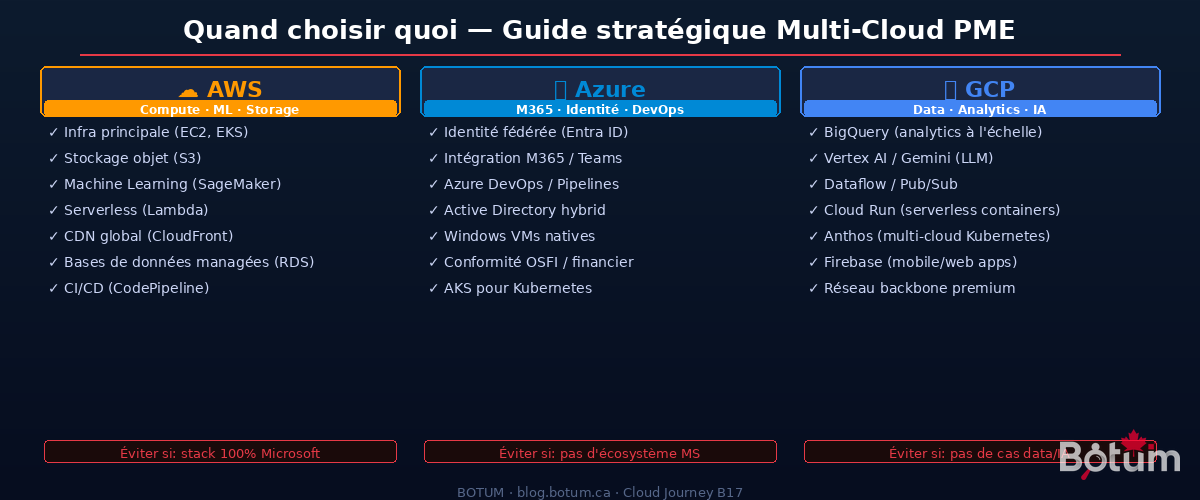
The question isn't "which cloud is the best" — it's "the best for what":
Choose AWS when: you need the best compute service ecosystem (EC2, ECS, EKS, Lambda), the most mature object storage (S3), the largest ML marketplace (SageMaker, Bedrock), or the widest global coverage (33 regions). AWS is the right choice for the primary production environment of a tech SMB that isn't deeply anchored in the Microsoft ecosystem.
Choose Azure when: your company uses M365 (Outlook, Teams, SharePoint) — it's an economic no-brainer, the integration is native and the savings are real. Azure is also the logical choice if you have an on-premises Active Directory to hybridize, if you manage Windows Server workloads, or if you're in a regulated Canadian sector that prefers Microsoft for contractual commitments.
Choose GCP when: you have significant analytics needs (BigQuery is unbeatable at its price point), AI/ML projects that will benefit from TPUs and Vertex AI, mobile or web applications (Firebase), or if you need premium low-latency network infrastructure (Google's network backbone is objectively superior for certain traffic types).
Multi-Cloud Management Tools
Managing three clouds without the right tools is guaranteed to create the complexity that gives multi-cloud a bad reputation. The tools that make the difference:
- Google Anthos: Google's multi-cloud and hybrid management platform. Deploy and manage Kubernetes workloads on any cloud or on-premises from a unified interface. Strong when GCP is your primary cloud.
- Azure Arc: extends Azure services (governance, policy, monitoring) to any infrastructure — AWS, GCP, on-premises, edge. Particularly powerful for Azure-centric companies wanting a unified view.
- Crossplane: open-source, CNCF incubating. Provision cloud resources from Kubernetes. Infrastructure becomes Custom Resources. Ideal for teams that live in Kubernetes.
- CloudHealth (VMware Aria): multi-cloud cost management and governance. Visibility into what you're spending on each cloud, by team, by project, by environment. Indispensable when you reach $10k USD/month in cloud spend.
- Spot.io (NetApp): cloud cost optimization. Uses AI to transparently mix Spot/Preemptible instances with on-demand instances. Typical savings of 60-80% on batch and non-critical workloads.
Common Mistakes That Turn Multi-Cloud into Operational Hell
🚨 Wanting to Replicate Everything Everywhere
The classic mistake: "We'll deploy the same thing on AWS and Azure for resilience." Result: double the costs, double the complexity, double the chances of desynchronization between the two. Multi-cloud resilience requires asymmetric architecture — not copy-paste. Define your primary cloud and your secondary cloud with distinct roles.
🚨 Underestimating Egress Fees
Inter-cloud egress fees are invisible in cost estimates until the first real bill. AWS charges 8-9 cents/GB for data leaving its regions. Azure and GCP the same. A naive architecture that synchronizes databases between AWS and Azure can generate bills of several thousand dollars per month in egress alone. Rule: colocate data with the services that consume it.
🚨 No Centralized Governance
Without central governance, each team creates its own cloud accounts, its own IAM configurations, its own deployment patterns. In 18 months, you have 47 AWS accounts, 23 Azure subscriptions, and nobody knows exactly what's running. Set up an AWS Organization with SCPs from day one, an Azure Management Group hierarchy, and a GCP Organization with folder structure. Too early for that? No — it's exactly the right time.
🚨 Ignoring IAM Model Differences
AWS IAM, Azure Entra ID, and GCP Cloud IAM have fundamentally different models. An AWS policy "Deny unless MFA" doesn't directly translate to Azure Conditional Access. Training your teams on the nuances of each model is not optional — it's the foundation of multi-cloud security.
🚨 No Exit Plan
One of the main arguments for multi-cloud is avoiding vendor lock-in. But if you've never tested your ability to move a workload from one cloud to another, you have virtual lock-in even with multiple providers. Do an annual portability exercise — choose a non-critical service and migrate it from one cloud to another. You'll learn a tremendous amount about your real dependencies.
BOTUM Real Case: SMB with AWS Prod, Azure M365, GCP Analytics
Context: Quebec SaaS publisher, 65 employees, $2.4M ARR. Initial stack: everything on AWS. After 3 years of growth, the actual situation:
- AWS: application production (EKS + RDS + S3), CI/CD (CodePipeline), CDN (CloudFront)
- Azure (unplanned): M365 for all internal collaboration (Teams, SharePoint, Outlook), Azure DevOps for part of the code. Hybrid AD between on-prem and Azure.
- GCP (unplanned): a BigQuery pilot project launched by the data team "to test" — which became the main analytics pipeline.
Problem: three clouds, three separate teams, three isolated billing systems. The data team didn't know that BigQuery jobs reading data from S3 were generating $400 USD/month in AWS egress. Identities were managed in silos. No consolidated view of costs.
What BOTUM put in place:
- Unified governance: AWS Organization with SCPs, Azure Management Group, GCP folder hierarchy. All spending consolidated in CloudHealth.
- Federated identity: Azure Entra ID as primary IdP (already used for M365). Federated to AWS IAM Identity Center (SAML 2.0) and GCP Workforce Identity Federation. One login, everywhere.
- BigQuery data migration: instead of reading S3 from GCP (egress 8 cents/GB), data is copied to GCS (Google Cloud Storage) overnight via a Cloud Run job. BigQuery reads GCS — zero egress. Savings: $380 USD/month.
- Unified IaC: all Terraform, separate modules per cloud, shared state in S3 with DynamoDB locking. The infra team manages all three clouds from the same workflow.
- Unified monitoring: Datadog as the common observability layer. AWS, Azure, and GCP metrics in a single dashboard. Unified alerting.
Results after 6 months:
- Cloud spending reduced by 28% ($380 USD/month egress + 15% Spot.io savings on AWS + Azure EA negotiation)
- Incident resolution time reduced by 45% (unified monitoring)
- New dev onboarding reduced from 3 weeks to 5 days (IaC + federated identity)
- Zero vendor lock-in: demonstrated ability to migrate batch workloads from AWS to GCP in 2 weeks
Conclusion: Multi-Cloud Is Manageable — If You Choose It
Multi-cloud is a reality for most growing SMBs. The question isn't "do I want to be multi-cloud" — it often already is. The real question is: "am I managing it intentionally, or am I accumulating operational debt?"
The tools exist. Terraform for infrastructure abstraction, Kubernetes for application portability, federated identity for security, CloudHealth for cost visibility. None of these tools are magic — all require an initial investment. But that investment is infinitely less than the cost of unmanaged multi-cloud chaos.
The BOTUM rule: start with inventory, define each cloud's role, federate identities, then add abstraction layers. In that order. Not the reverse.
🚀 Multi-Cloud Architecture with BOTUM
Avoid vendor lock-in and optimize your multi-cloud strategy. BOTUM teams are here to guide you.
Discuss your project →Download this multi-cloud guide as a PDF.
⬇ Download the guide (PDF)
