
K3s: Lightweight Kubernetes on Proxmox for SMEs
Deploy K3s on Proxmox: 1 master + 2 workers cluster, Nginx deployment, kubectl and Helm. Kubernetes accessible for SMEs.

Kubernetes is intimidating. And honestly, for a long time I understood why — dozens of components, endless YAMLs, a brutal learning curve. K3s changed my perspective. In 5 minutes, you have a functional Kubernetes cluster. This guide shows you how to deploy K3s on Proxmox, configure persistent storage, and deploy your first production applications.
Why K3s for SMEs?
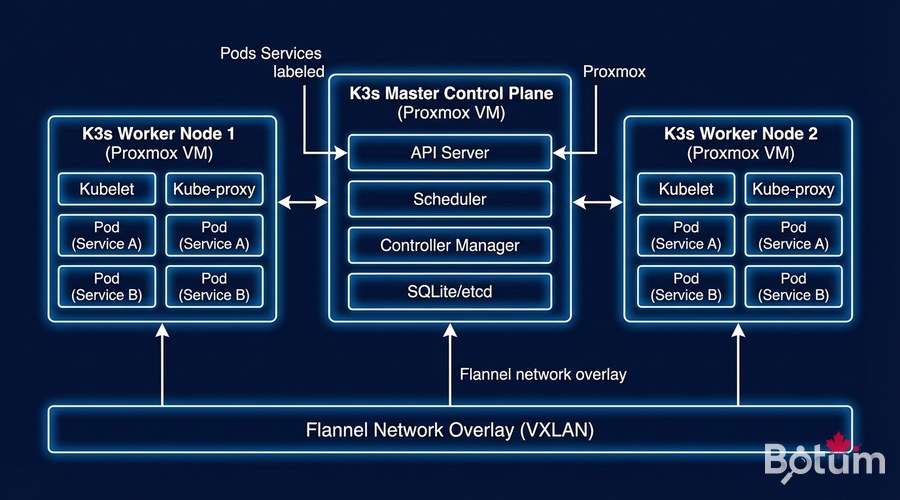
K3s is complete Kubernetes, packaged in a single 60MB binary. It removes components rarely used in production (AWS/Azure/GCP cloud drivers, legacy APIs) and replaces them with lightweight equivalents. Result: runs on a Raspberry Pi 4, or in Proxmox VMs with 2 vCPU / 2 GB RAM.
- Single binary: no dependencies to install, trivial deployment
- SQLite by default: no separate etcd needed for small clusters
- Integrated Traefik: HTTP ingress controller ready to use
- Containerd: lightweight container runtime (Docker not required)
- ARM64 supported: runs on Raspberry Pi for labs
- HA available: high availability cluster with 3+ nodes
Preparing Proxmox VMs
Recommended VM Configuration
- Master VM: 2 vCPU, 4 GB RAM, 40 GB SSD
- Worker VMs x2: 4 vCPU, 8 GB RAM, 80 GB SSD
- OS: Ubuntu Server 22.04 LTS or 24.04 LTS
- Network: virtio bridge, fixed IPs (or DHCP reservations)
# On EACH VM — System preparation
# Disable swap (mandatory for Kubernetes)
sudo swapoff -a
sudo sed -i '/ swap / s/^/#/' /etc/fstab

# Required kernel modules
cat << 'EOF' | sudo tee /etc/modules-load.d/k8s.conf
overlay
br_netfilter
EOF
sudo modprobe overlay
sudo modprobe br_netfilter

# Kubernetes network parameters
cat << 'EOF' | sudo tee /etc/sysctl.d/k8s.conf
net.bridge.bridge-nf-call-iptables  = 1
net.bridge.bridge-nf-call-ip6tables = 1
net.ipv4.ip_forward                 = 1
EOF
sudo sysctl --system

# Update /etc/hosts on ALL VMs
# 192.168.1.10  k3s-master
# 192.168.1.11  k3s-worker1
# 192.168.1.12  k3s-worker2
K3s Installation — Master (Control Plane)
# Install K3s master (single command!)
curl -sfL https://get.k3s.io | sh -s - server   --cluster-init   --tls-san 192.168.1.10   --disable traefik   --write-kubeconfig-mode 644

# Verify K3s is running
sudo systemctl status k3s
sudo kubectl get nodes

# Get the token to join workers
sudo cat /var/lib/rancher/k3s/server/node-token
Joining Workers
# On EACH worker — Join the cluster
curl -sfL https://get.k3s.io | K3S_URL=https://<MASTER_IP>:6443   K3S_TOKEN=<TOKEN> sh -s - agent

# Verify on the MASTER that workers have joined
sudo kubectl get nodes -o wide
# Expected output:
# NAME          STATUS   ROLES                  AGE
# k3s-master    Ready    control-plane,master   5m
# k3s-worker1   Ready    <none>                 2m
# k3s-worker2   Ready    <none>                 1m
Configure kubectl on Your Local Machine
# Install kubectl locally
curl -LO "https://dl.k8s.io/release/$(curl -L -s https://dl.k8s.io/release/stable.txt)/bin/linux/amd64/kubectl"
sudo install kubectl /usr/local/bin/

# Copy K3s config from master
mkdir -p ~/.kube
scp user@192.168.1.10:/etc/rancher/k3s/k3s.yaml ~/.kube/config
sed -i 's/127.0.0.1/192.168.1.10/g' ~/.kube/config

kubectl get nodes
kubectl cluster-info
Install Nginx Ingress + Cert-Manager
# Install Helm
curl https://raw.githubusercontent.com/helm/helm/main/scripts/get-helm-3 | bash

# Nginx Ingress Controller
helm repo add ingress-nginx https://kubernetes.github.io/ingress-nginx
helm install ingress-nginx ingress-nginx/ingress-nginx   --namespace ingress-nginx --create-namespace   --set controller.service.type=LoadBalancer

# Cert-Manager (Let's Encrypt SSL certificates)
helm repo add jetstack https://charts.jetstack.io
helm install cert-manager jetstack/cert-manager   --namespace cert-manager --create-namespace   --set installCRDs=true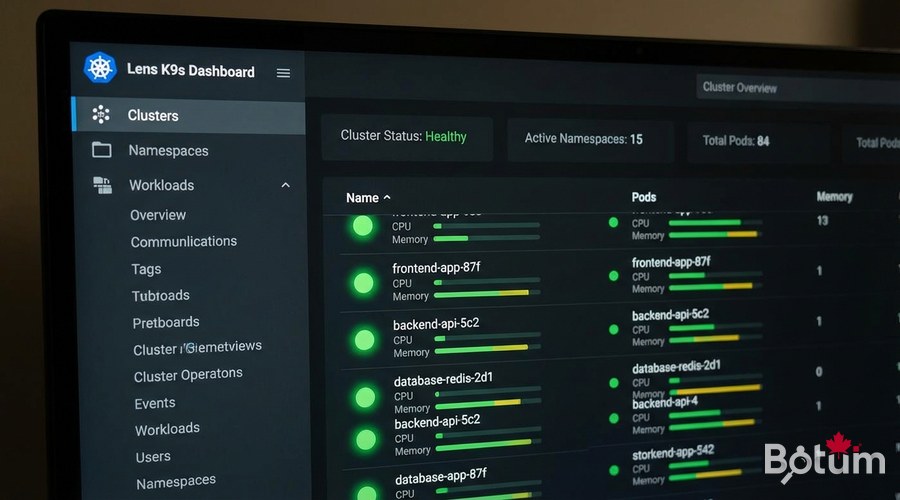
Deploy Your First Application
# Create namespace
kubectl create namespace my-app

# PostgreSQL deployment with persistent storage
cat << 'EOF' | kubectl apply -f -
apiVersion: apps/v1
kind: Deployment
metadata:
  name: postgres
  namespace: my-app
spec:
  replicas: 1
  selector:
    matchLabels:
      app: postgres
  template:
    metadata:
      labels:
        app: postgres
    spec:
      containers:
      - name: postgres
        image: postgres:15
        env:
        - name: POSTGRES_PASSWORD
          valueFrom:
            secretKeyRef:
              name: postgres-secret
              key: password
        ports:
        - containerPort: 5432
        volumeMounts:
        - name: postgres-data
          mountPath: /var/lib/postgresql/data
      volumes:
      - name: postgres-data
        persistentVolumeClaim:
          claimName: postgres-pvc
EOF
Monitoring with Grafana + Prometheus
# Install kube-prometheus stack (all-in-one)
helm repo add prometheus-community https://prometheus-community.github.io/helm-charts
helm install kube-prometheus prometheus-community/kube-prometheus-stack   --namespace monitoring --create-namespace   --set grafana.service.type=LoadBalancer   --set grafana.adminPassword='YourSecurePassword'

kubectl get svc -n monitoring
kubectl top nodes
kubectl top pods -n my-app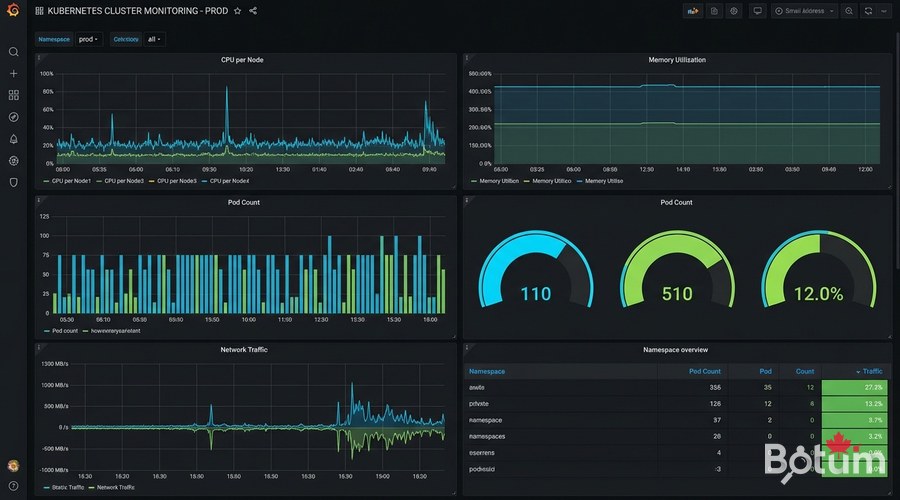
Cluster State Backup
# Backup K3s state (SQLite database)
sudo systemctl stop k3s
sudo cp -r /var/lib/rancher/k3s/server/db /backup/k3s-db-$(date +%Y%m%d)
sudo systemctl start k3s

# With Velero (Kubernetes cloud backup)
helm install velero vmware-tanzu/velero   --namespace velero --create-namespace

# Create a full backup
velero backup create full-backup --include-namespaces '*'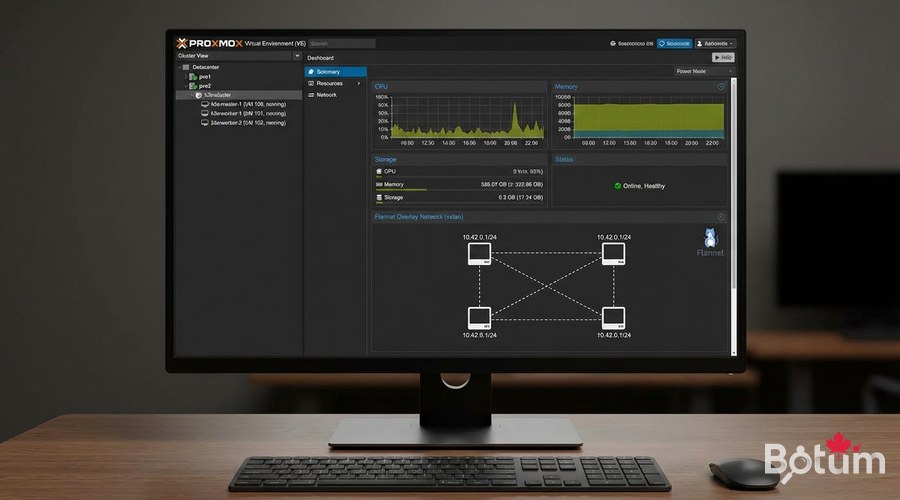
Next Steps
- Scale to HA cluster with 3 masters (high availability)
- Configure Longhorn for distributed persistent storage (replaces local PVCs)
- Implement NetworkPolicies for namespace isolation (Zero Trust Kubernetes)
- Set up ArgoCD or Flux for GitOps (automated Git-driven deployments)
- Configure a private Docker registry with Harbor for internal images
Téléchargez ce guide en PDF pour le consulter hors ligne.
⬇ Télécharger le guide (PDF)🚀 Aller plus loin avec BOTUM
Ce guide couvre les bases. En production, chaque environnement a ses spécificités. Les équipes BOTUM accompagnent les organisations dans le déploiement, la configuration avancée et la sécurisation de leur infrastructure. Si vous avez un projet, parlons-en.
Discuter de votre projet →
