
Infrastructure as Code: Terraform, Ansible, GitOps for SMBs
Done with click-ops. Terraform for cloud, Ansible for servers, GitOps for the pipeline — practical IaC guide for SMBs with BOTUM real case (4h → 11 min).
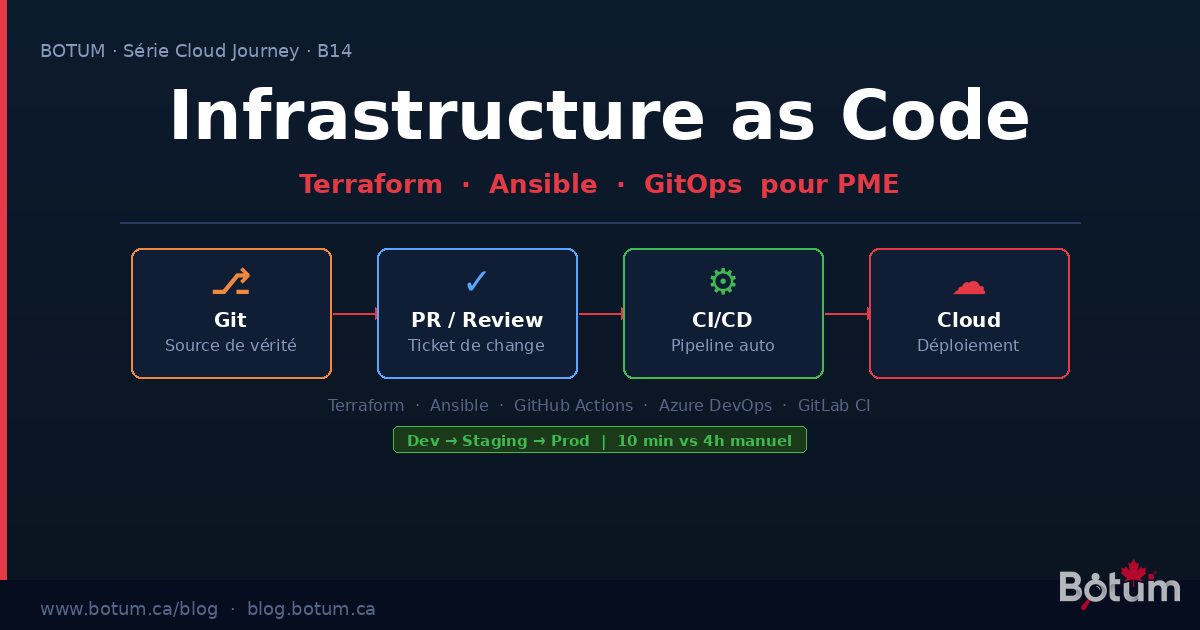
Your cloud infrastructure was built by hand. A click here, an Azure portal session there, a VM created in the AWS console on a Friday night under pressure. Six months later, nobody really knows what's running, why, or how to reproduce it in case of disaster. That's "click-ops" — and it's the leading source of technical debt in the IT organizations we work with at BOTUM.
Infrastructure as Code (IaC) is the structural answer to this problem. Not a trend, not a luxury reserved for large enterprises — a prerequisite for any SMB that wants to master its cloud infrastructure in 2025.
Real IaC: Declaring Desired State, Not Steps
The fundamental distinction of IaC is philosophical before it's technical: you declare what you want, not how to get there. You write "I want a Standard_B2s VM in East US with a 128 GB disk and this security group" — and the tool handles creating, modifying, or deleting resources so reality matches that declaration.
This is the declarative approach, opposed to the imperative approach (sequential creation scripts). Declarative is idempotent: applying the same code twice produces the same result, with no side effects.
Concretely, your infrastructure becomes versioned code in Git: full history, code reviews, instant rollback, audit trail. Everything you already do for your application code, you now do for your infrastructure.
Terraform: Cloud Provisioning
Terraform (HashiCorp, open-source) is the de facto standard for provisioning cloud resources: VMs, VNets, databases, load balancers, DNS, IAM. It talks to the API of 3,000+ providers (Azure, AWS, GCP, Cloudflare, GitHub...).
A concrete example — creating an Azure resource group and VM:
# main.tf
terraform {
  required_providers {
    azurerm = {
      source  = "hashicorp/azurerm"
      version = "~> 3.90"
    }
  }
  backend "azurerm" {
    resource_group_name  = "rg-tfstate"
    storage_account_name = "botumtfstate"
    container_name       = "tfstate"
    key                  = "prod.terraform.tfstate"
  }
}

resource "azurerm_resource_group" "main" {
  name     = "rg-botum-prod"
  location = "canadacentral"
}

resource "azurerm_linux_virtual_machine" "app" {
  name                = "vm-app-prod-01"
  resource_group_name = azurerm_resource_group.main.name
  location            = azurerm_resource_group.main.location
  size                = "Standard_B2s"
  admin_username      = "azureuser"

  network_interface_ids = [azurerm_network_interface.app.id]

  os_disk {
    caching              = "ReadWrite"
    storage_account_type = "Premium_LRS"
    disk_size_gb         = 128
  }

  source_image_reference {
    publisher = "Canonical"
    offer     = "0001-com-ubuntu-server-jammy"
    sku       = "22_04-lts"
    version   = "latest"
  }
}
Key points:
- State file: Terraform maintains a record of what it created (
terraform.tfstate). This file must be stored in a remote backend (Azure Blob, S3) — never local, never in Git. This is the main source of disasters for beginners. - Modules: Group logical resources into reusable modules (
module "vm" { source = "./modules/vm" }). A module for VMs, one for the database, one for networking. Reusable across projects. - Plan before Apply:
terraform planshows exactly what will change — like a diff — before any deployment. In CI/CD, this plan is submitted for human approval beforeapply.
Ansible: Configuration and Deployment
Terraform creates the infrastructure. Ansible configures it. Once your Azure VM is created, Ansible installs Nginx, copies configs, creates user accounts, configures TLS certificates — idempotently.
A basic Ansible playbook to configure a web server:
# playbooks/web-server.yml
---
- name: Configure web server
  hosts: web_servers
  become: yes
  vars:
    app_port: 8080
    app_user: botum

  tasks:
    - name: Install nginx
      ansible.builtin.apt:
        name: nginx
        state: present
        update_cache: yes

    - name: Deploy nginx config
      ansible.builtin.template:
        src: templates/nginx.conf.j2
        dest: /etc/nginx/sites-available/botum
        mode: '0644'
      notify: Reload nginx

    - name: Create app user
      ansible.builtin.user:
        name: "{{ app_user }}"
        system: yes
        shell: /usr/sbin/nologin

  handlers:
    - name: Reload nginx
      ansible.builtin.service:
        name: nginx
        state: reloaded
What makes Ansible powerful for SMBs:
- Idempotence: Running the same playbook 10 times produces the same result. No side effects, no "already installed" failures.
- Agentless: Ansible connects via SSH — no agent to install on target servers.
- Roles: Structure your playbooks into reusable roles (role
nginx, rolepostgresql, rolemonitoring). Ansible Galaxy provides hundreds of tested community roles. - Dynamic inventory: Ansible can query Azure/AWS to automatically discover VMs to configure — no static list to maintain.
GitOps: Git as the Single Source of Truth
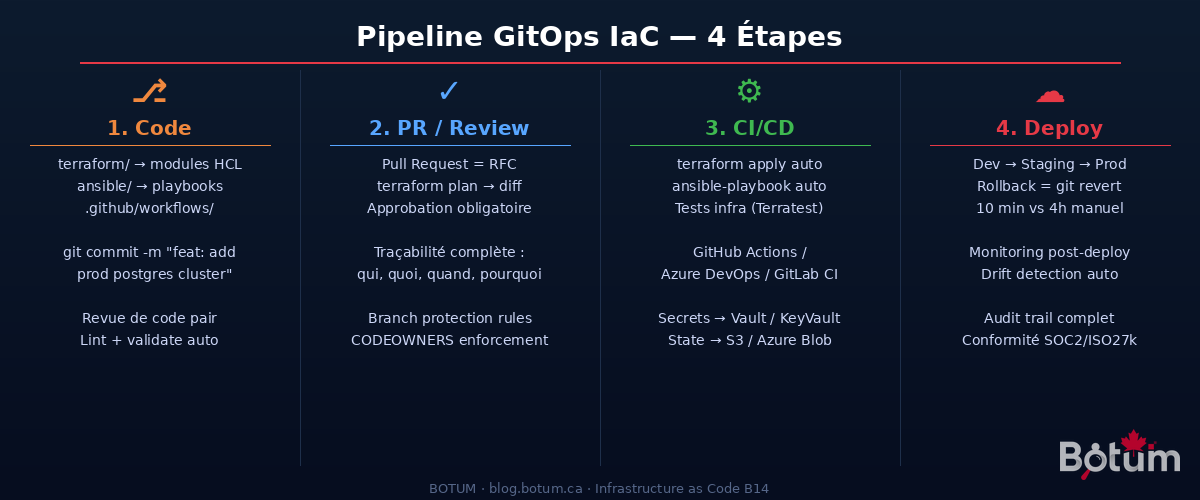
GitOps is the principle that unifies everything: Git is the single source of truth for the desired state of your infrastructure. Every change goes through a Pull Request — which automatically makes it an auditable change ticket, with discussion, approval, and history.
The complete flow with GitHub Actions:
# .github/workflows/terraform.yml
name: Terraform CI/CD

on:
  pull_request:
    paths: ['terraform/**']
  push:
    branches: [main]
    paths: ['terraform/**']

jobs:
  plan:
    runs-on: ubuntu-latest
    if: github.event_name == 'pull_request'
    steps:
      - uses: actions/checkout@v4
      - uses: hashicorp/setup-terraform@v3
        with:
          terraform_version: "1.7.0"
      - name: Terraform Init
        run: terraform -chdir=terraform init
        env:
          ARM_CLIENT_ID: ${{ secrets.ARM_CLIENT_ID }}
          ARM_CLIENT_SECRET: ${{ secrets.ARM_CLIENT_SECRET }}
          ARM_SUBSCRIPTION_ID: ${{ secrets.ARM_SUBSCRIPTION_ID }}
          ARM_TENANT_ID: ${{ secrets.ARM_TENANT_ID }}
      - name: Terraform Plan
        run: terraform -chdir=terraform plan -out=tfplan
      - name: Comment PR
        uses: actions/github-script@v7
        # Posts the plan as a PR comment for review

  apply:
    runs-on: ubuntu-latest
    if: github.ref == 'refs/heads/main' && github.event_name == 'push'
    environment: production  # Manual approval required
    steps:
      - uses: actions/checkout@v4
      - name: Terraform Apply
        run: terraform -chdir=terraform apply -auto-approve
The result: every infrastructure change is a PR. The Terraform plan is posted as a comment automatically. A second engineer approves. The merge triggers the automatic apply. Git history shows exactly who changed what, when, and why (commit message).
Terraform vs Ansible: Who Does What
| Criteria | Terraform | Ansible |
|---|---|---|
| Main role | Provisioning (create/destroy resources) | Configuration (install, configure, deploy) |
| Target | Cloud APIs (Azure, AWS, GCP, DNS, FW...) | Existing servers (OS, packages, files) |
| Approach | Declarative (HCL) | Declarative + procedural (YAML) |
| State | State file (explicit management) | Stateless (state read from server each run) |
| Idempotence | Yes (native) | Yes (if modules well-written) |
| Learning curve | Medium (HCL, state, providers) | Low (readable YAML) |
| SMB use case | Create VMs, VNets, DBs, LBs in cloud | Configure Nginx, Postgres, deploy apps |
Simple rule: Terraform for everything in the cloud portal. Ansible for everything done via SSH on a server.
For SMBs: Start Simple
The temptation is to move too fast — Terragrunt, Pulumi, ArgoCD, all at once. Bad idea. Here's the recommended progression for a 10-200 employee SMB:
Step 1 — One repo, simple structure:
infra-repo/
├── terraform/
│   ├── environments/
│   │   ├── dev/
│   │   ├── staging/
│   │   └── prod/
│   └── modules/
│       ├── vm/
│       └── network/
├── ansible/
│   ├── inventory/
│   ├── playbooks/
│   └── roles/
└── .github/
    └── workflows/
        ├── terraform.yml
        └── ansible.yml
Step 2 — Start with the dev environment. Migrate dev to IaC first. Learn, make mistakes without production impact. Refine modules. Measure time savings.
Step 3 — Extend to staging then prod. Same code, different variables. The value of IaC explodes when you can create staging in 10 minutes from proven prod modules.
Step 4 — Basic GitHub Actions pipeline. Automatic plan on PRs. Manual apply (approval) on main. No need for more to start.
Pitfalls That Hurt
❌ State file local or in Git
The terraform.tfstate contains secrets in plain text (database passwords, API keys). Committing to Git = credential leak. The solution: encrypted remote backend (Azure Blob with CMK, S3 with SSE, Terraform Cloud). No exceptions.
❌ Secrets hardcoded in HCL or YAML files
A password = "MyPassword123" in a versioned Terraform file is a classic mistake. Use environment variables injected by CI/CD from a secrets manager (Azure Key Vault, AWS Secrets Manager, HashiCorp Vault). In Ansible: ansible-vault encrypt for sensitive files.
❌ Unpinned Terraform versions
Without required_version = "~> 1.7.0" and version = "~> 3.90" on providers, an automatic update can break your pipeline overnight. Always pin versions. Always test provider upgrades in dev first.
❌ No environment separation
A single state file for dev/staging/prod = disaster. An accidental terraform destroy in "dev" can kill production if workspaces aren't properly isolated. Use separate directories or Terraform workspaces with distinct backends.
BOTUM Real Case: 3 Environments, 10-Minute Deployment
B2B SaaS client, 35 employees, Azure stack. Initial situation: infrastructure created by hand over years. No up-to-date documentation. A newly hired DevOps spent 3 weeks just "understanding what's running." Post-incident recovery: 4 hours minimum to recreate a staging environment.
IaC migration carried out with BOTUM — 6 weeks:
- Weeks 1-2: infrastructure audit, importing existing resources into Terraform (
terraform import), creating VM/network/DB modules - Weeks 3-4: Ansible structuring (nginx, node.js, postgresql, monitoring roles), testing in dev
- Weeks 5-6: GitHub Actions pipeline (auto plan on PR, apply on merge with approval), staging then prod migration
Stack deployed:
- Terraform 1.7 + AzureRM provider 3.x → AKS provisioning, Azure PostgreSQL Flexible, Key Vault, VNet
- Ansible 2.16 → worker configuration, Node.js app deployment, Let's Encrypt certificate rotation
- GitHub Actions → full pipeline, secrets in Azure Key Vault via federated identity (OIDC, zero secrets stored in GitHub)
- State file in Azure Blob Storage with CMK encryption + state locking (anti-concurrent)
Results:
- Creating a complete staging environment: 4 hours → 11 minutes
- Onboarding a new DevOps: 3 weeks → 2 days (reading the repo = understanding the infrastructure)
- Incidents from manual misconfiguration: 0 since IaC deployment
- Compliance audit (Enterprise security review): all changes tracked in Git
The key transformation: infrastructure went from one person's "tribal knowledge" to a documented, versioned, testable company asset.
Conclusion: IaC Is Not Optional
Infrastructure as Code is no longer an "advanced" practice reserved for 50-engineer teams. It's the minimum for any SMB that wants:
- Reproducibility: recreate an environment in minutes, not days
- Traceability: know exactly who changed what in your infrastructure
- Resilience: instant rollback, scriptable disaster recovery
- Compliance: audit trail for SOC2, ISO 27001, PIPEDA
The entry point is simple: start with a single repo, Terraform for the cloud, Ansible for VMs, GitHub Actions for the pipeline. You'll get 80% of the value with 20% of the complexity.
🚀 Go Further with BOTUM
Implementing IaC in your organization? BOTUM teams guide you from A to Z.
Discuss your project →Download this IaC guide as a PDF.
⬇ Download Guide (PDF)
