
FinOps: Cloud Cost Management for Canadian SMBs
Your cloud bill tripled in the first month? Discover how Canadian SMBs apply FinOps to reduce cloud costs by 30 to 47% — real tools, concrete levers, and a BOTUM case study.
The scene repeats itself in almost every SMB migrating to the cloud. The decision is made, the enthusiasm is there: "We're finally going to save money on our infrastructure!" Then the first AWS, Azure or GCP bill arrives. It's three times higher than expected. The silence in the boardroom says it all.
This isn't a bug — it's the nature of the cloud. The pay-as-you-go model is powerful, but it's merciless if you don't actively manage it. The good news: a discipline exists for exactly this. It's called FinOps, and it's within reach of any SMB — even without a dedicated team.
What FinOps Really Is
FinOps isn't a tool. It's not just a budget line either. It's a cultural practice that brings Finance, DevOps and Product teams together around a shared goal: aligning every dollar spent on cloud with the business value it generates.
The FinOps Foundation, which defines the standard framework, sums it up: "FinOps is an evolving cloud financial management discipline and cultural practice that enables organizations to get maximum business value by helping engineering, finance, technology and business teams to collaborate on data-driven spending decisions."
In practice, this means:
- Engineers know what their code costs in production
- Finance understands why a cost spike is normal during a product launch
- Capacity decisions are based on real data, not estimates
- Everyone shares responsibility for spend — not just the CFO receiving the bill
For a 15-to-200 employee SMB, this might sound ambitious. In reality, the principles apply with a single "FinOps champion" — a senior DevOps engineer or CTO dedicating 20% of their time to it.
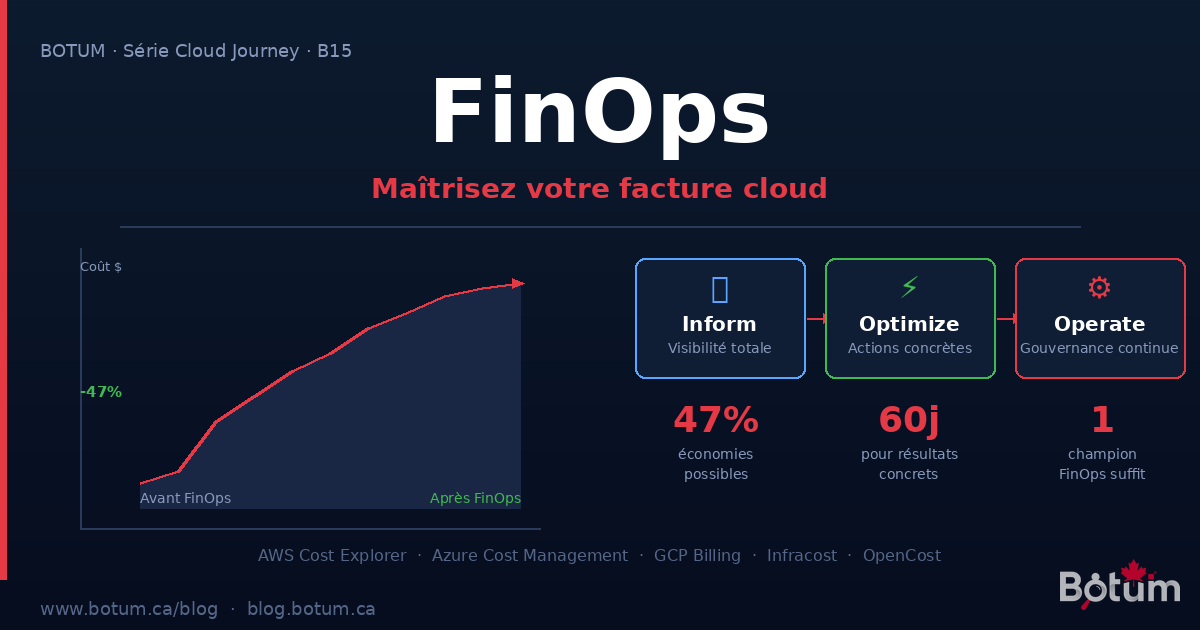
The 3 FinOps Lifecycle Phases
The FinOps framework defines an iterative three-phase cycle. You never exit it — you continuously iterate:
Phase 1 — Inform: Total Visibility
Before optimizing anything, you need to see where the money goes. This seems obvious; it isn't. Most organizations receive their cloud bill as an opaque block.
- Activate tagging: every resource carries a
project,environment,team,ownertag - Configure cost allocation reports (AWS Cost Explorer, Azure Cost Analysis)
- Create budgets per team / project / environment
- Set up alerts at 50%, 80%, 100% of monthly budget
Goal: answer "who spends what, on what?" in under 5 minutes.
Phase 2 — Optimize: Concrete Actions
Once visibility is established, you identify savings opportunities and implement them. This is the most tangible phase — where the bill goes down.
- Rightsizing oversized instances
- Purchasing Reserved Instances or Savings Plans for stable workloads
- Migrating batch workloads to Spot/Preemptible Instances
- Deleting orphaned resources (IPs, snapshots, empty load balancers)
- Implementing aggressive auto-scaling for dev/staging environments
Phase 3 — Operate: Continuous Governance
Optimization isn't a project with an end date. It's an ongoing process. This phase establishes mechanisms that sustain savings over time:
- Monthly cost reviews (30 minutes, entire engineering team)
- Auto-shutdown policies for development environments
- Approval required for instances above a certain size
- Drift alerts when spend exceeds an established baseline
FinOps Tools — Cloud Native and Open Source
Each cloud provider offers its own financial visibility tools. Here's what's immediately usable:
AWS Cost Explorer: the most complete tool on the market. Visualization by service, tag, region, usage type. The "Rightsizing Recommendations" view automatically identifies your oversized instances with savings estimates. Cost: $0.01 USD per API request — negligible.
Azure Cost Management + Billing: built into the Azure portal. Allows creating budgets by Resource Group, tag, or subscription. Alerts are configurable via email and webhook. Azure Advisor integration provides rightsizing recommendations directly in the console.
GCP Billing Reports: native BigQuery dashboards with automatic export to a dataset. Enables custom SQL queries on your cost history — particularly powerful for identifying usage patterns over 12 months.
Infracost: open source tool that integrates into your CI/CD pipeline. On every Terraform Pull Request, it calculates the cost delta of your infrastructure changes and posts it as a PR comment. An engineer knows exactly what their change will cost before merging.
OpenCost: CNCF open source tool for Kubernetes environments. Allocates costs per namespace, deployment, and label. Essential if you use Kubernetes and want to know what each microservice actually costs.
The 5 Optimization Levers
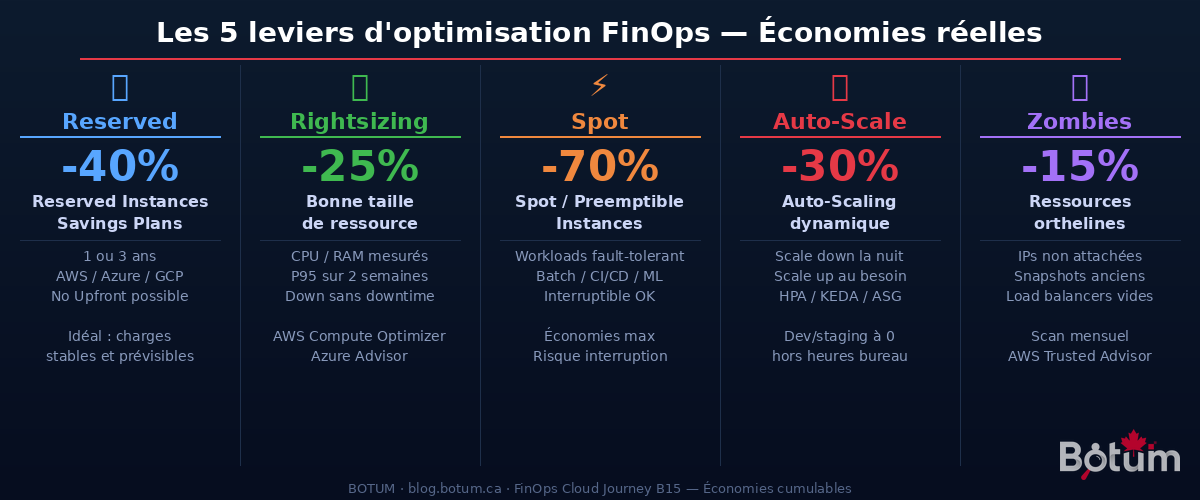
1. Reserved Instances and Savings Plans (-30% to -40%)
If you have stable and predictable workloads — a database server, a production application cluster — you're leaving money on the table by paying On-Demand by the minute.
Reserved Instances (AWS) or Savings Plans offer up to 40% reduction in exchange for a 1 or 3-year commitment. The "No Upfront" option requires no initial payment — just a duration commitment. On AWS, an m5.xlarge On-Demand costs ~$0.192/h; in 1-year Reserved No Upfront: ~$0.118/h. Over 8,760 annual hours: $645 in savings per instance.
2. Rightsizing (-20% to -30%)
Most cloud instances are oversized. Provisioned in a rush for a launch, nobody has reviewed the size since. A 14-day analysis of CPU/RAM metrics often reveals the instance is running at 15% CPU on average.
AWS Compute Optimizer and Azure Advisor do this automatically. The rule: measure the P95 (95th percentile) of utilization, not the absolute peak. If your m5.2xlarge rarely exceeds 40% CPU at P95, an m5.xlarge will do — at half the price.
3. Spot and Preemptible Instances (-60% to -75%)
Spot Instances (AWS), Spot VMs (Azure), or Preemptible Instances (GCP) use excess datacenter capacity. 60 to 75% cheaper, they can be reclaimed by the provider with a 2-minute notice.
Suited for interruption-tolerant workloads: CI/CD pipelines, data processing jobs, ML training, video rendering. Your GitHub Actions pipeline running 4 hours per day can cost 75% less on Spot workers.
4. Dynamic Auto-Scaling (-25% to -35%)
Auto-scaling isn't just for traffic spikes — it's also the primary tool for reducing costs outside business hours.
Concrete policy: development and staging environments scale down to zero instances at night (10 PM–8 AM) and on weekends. For a company with 5 dev/staging environments on AWS, this represents 65% savings on those instances (16 hours active per day = ~33% uptime). On Kubernetes, Cluster Autoscaler + KEDA can scale unused namespaces to zero.
5. Deleting Orphaned Resources (-10% to -20%)
"Cloud zombies" accumulate silently. A developer deletes a VM but forgets its Elastic IP ($0.005/h for nothing). EBS snapshots pile up over 2 years. A load balancer created for a test 8 months ago is still running.
A monthly scan with AWS Trusted Advisor, Azure Advisor, or the open source cloud-nuke tool consistently reveals 5 to 15% of unused resources in any cloud account active for more than 6 months.
Comparison: Reserved vs On-Demand vs Spot
| Type | Savings vs On-Demand | Commitment | Use Case | Risk |
|---|---|---|---|---|
| On-Demand | Baseline (0%) | None | Variable loads, new projects | Max cost — avoid for stable production |
| Reserved 1 year | -30% to -37% | 1 year (flexible) | Production, DB, stable workloads | Low — underutilization if over-provisioned |
| Reserved 3 years | -40% to -60% | 3 years (fixed) | Very stable core infrastructure | Medium — rigidity over 3 years |
| Savings Plans | -25% to -40% | 1 or 3 years | Flexible (any instance family/region) | Low — more flexible than RI |
| Spot/Preemptible | -60% to -75% | None | Batch, CI/CD, ML, rendering | Interruption possible (2 min notice) |
FinOps Governance for SMBs
The tagging strategy is the foundation of everything. Without consistent tags, cost allocation is impossible. The minimum recommended taxonomy:
# Mandatory tags on all resources
Project     = "crm-v2"          # Project or product name
Environment = "production"      # dev / staging / production
Team        = "backend"         # Responsible team
Owner       = "marie.tremblay"  # Individual owner
CostCenter  = "IT-PROD-001"     # Accounting cost center
Enforce these tags via an Azure Policy ("Deny" on resources without required tags) or an AWS SCP (Service Control Policy). No resource can be created without tags — period.
Budget alerts are non-negotiable. Configure at minimum:
- Alert at 50% of monthly budget → information
- Alert at 80% of monthly budget → investigation required
- Alert at 100% → immediate action, Slack + management email notification
The SMB FinOps champion: you don't need a dedicated team. A single senior DevOps engineer dedicating 20% of their time to FinOps — roughly 8 hours per week — is sufficient to manage a cloud account up to $50,000 CAD/month.
Common Mistakes That Cost You
❌ Paying On-Demand by default
The worst mistake. A startup with stable production running for 6 months on On-Demand instances is easily leaving 30 to 40% of its bill on the table. The rule: once a workload has been running in production for 3 months, evaluate Reserved Instances or Savings Plans.
❌ Dev environments running 24/7
A development environment running at night and on weekends does nothing — it burns money. Implement Instance Schedulers (AWS) or Azure Auto-shutdown on all non-production environments. Typical savings: 60 to 70% of those instance costs.
❌ Accumulating EBS/disk snapshots
An EBS snapshot costs $0.05/GB/month. A 500 GB database with unmanaged retention accumulates 50 snapshots over 2 years = $1,250/month for backups nobody knows are still useful. Define a retention policy: 7-day daily, 4-week weekly, 12-month monthly — and automatically delete the rest.
❌ Ignoring egress fees
Outbound data transfer from the cloud is billed — and rarely anticipated. AWS charges $0.08 to $0.09/GB for internet egress. For an application with high outbound traffic, this can represent 15 to 25% of the total bill. Solutions: use CloudFront (AWS) or Azure CDN to cache assets, enable compression (gzip/brotli), and evaluate egress optimization strategies.
BOTUM Real Case: -47% in 60 Days
Context: B2B services SMB, 28 employees, AWS stack (EC2, RDS, S3, ALB). Initial monthly bill: $8,400 USD/month. The CTO reaches out after receiving an abnormally high bill alert.
Initial audit (weeks 1-2):
- 6
m5.xlargeEC2 instances in production running at 8-15% CPU on average - No Reserved Instances — everything On-Demand for 14 months
- 3 dev/staging environments active 24/7 (weekends included)
- 847 EBS snapshots accumulated over 2 years, representing 12 TB
- 4 unattached Elastic IPs, 2 empty load balancers, 1 unused NAT Gateway
- No consistent tagging — impossible to allocate costs by project
Action plan and execution (weeks 3-8):
- EC2 Rightsizing: 6 ×
m5.xlarge→ 6 ×t3.largeafter P95 analysis over 14 days. Savings: -$1,200 USD/month - Reserved Instances: 6 production instances + 2 RDS purchased as 1-year No Upfront RIs. Savings: -$1,650 USD/month
- Zombie cleanup: 843 snapshots deleted (retention policies configured), orphaned IPs and LBs removed. Savings: -$890 USD/month
- Dev/staging auto-shutdown: AWS Instance Scheduler on 3 environments, shutdown 10 PM–8 AM + weekends. Savings: -$620 USD/month
- Complete tagging: policy enforced via SCP. New visibility baseline established.
Result at 60 days: $8,400 → $4,452 USD/month. Savings: $3,948 USD/month (-47%). Nearly $47,400 over 12 months — for an investment of 3 weeks of audit and implementation work.
Where to Start This Week
If you've never done FinOps, here are the 3 immediate-impact actions:
- Enable Cost Explorer rightsizing recommendations on AWS (or Azure Advisor). You'll have a list of potential savings within 48 hours.
- Inventory your orphaned resources: unattached IPs, snapshots older than 90 days, load balancers with no targets. Delete them. Immediate savings.
- Configure a budget alert at 80% of your current monthly spend. You'll never be surprised by a bill again.
The rest — Reserved Instances, auto-scaling, complete governance — builds iteratively. But these 3 actions you can do this week, with no risk, no architecture review needed.
Download this FinOps guide as a PDF.
⬇ Download the guide (PDF)🚀 Go Further with BOTUM
FinOps audit, cloud optimization, bill reduction — BOTUM teams support Canadian SMBs.
Discuss your project →
