
Cloud Security for Canadian SMBs: Zero Trust, IAM, and Compliance
Capital One, Uber, Microsoft — these breaches shared one thing: client-side misconfiguration. Learn how to implement Zero Trust, robust IAM, and PIPEDA/PHIPA compliance for your Canadian SMB.
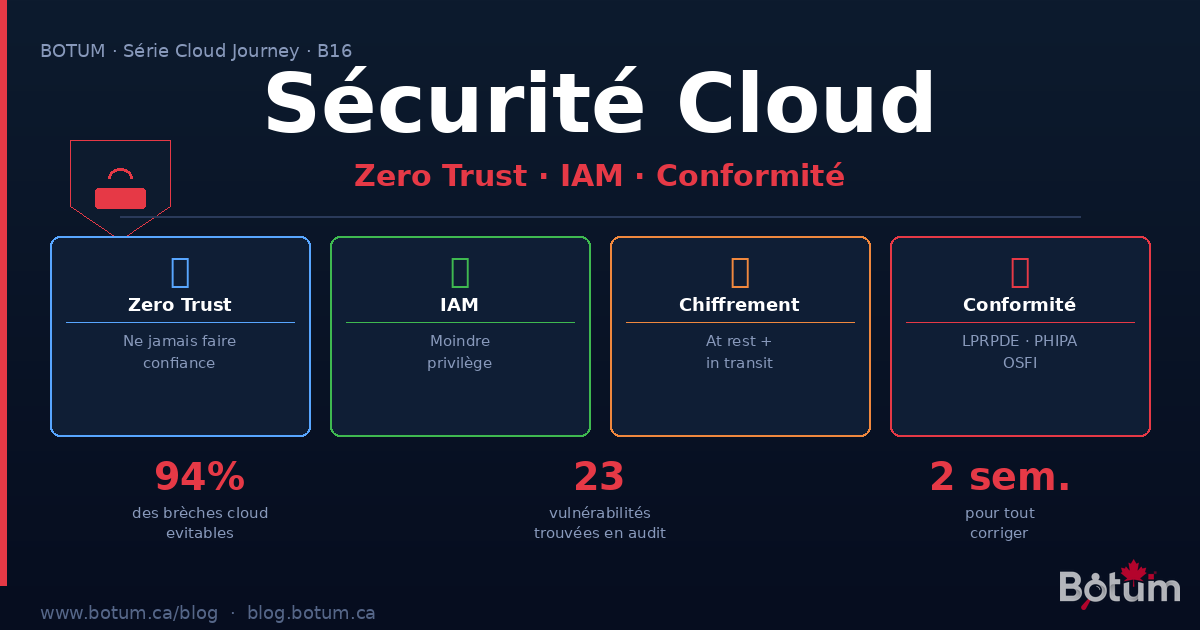
In 2019, Capital One had the personal data of 106 million customers stolen. The attack vector? A misconfigured AWS IAM role that provided access to instance metadata. In 2022, Uber suffered a catastrophic breach via credential stuffing, compounded by the absence of MFA on a VPN account. In 2023, Wiz researchers found over 38 terabytes of Microsoft data exposed on Azure Blob Storage — a training share configured with overly broad permissions.
These breaches share a troubling commonality: none were caused by a vulnerability in the cloud provider's infrastructure. AWS, Azure, and GCP had secured their side properly. The vulnerability was entirely on the client side.
If you think "migrating to the cloud" automatically makes you more secure, this post is for you.
The Shared Responsibility Model: What the Provider Manages vs. What You Must Manage
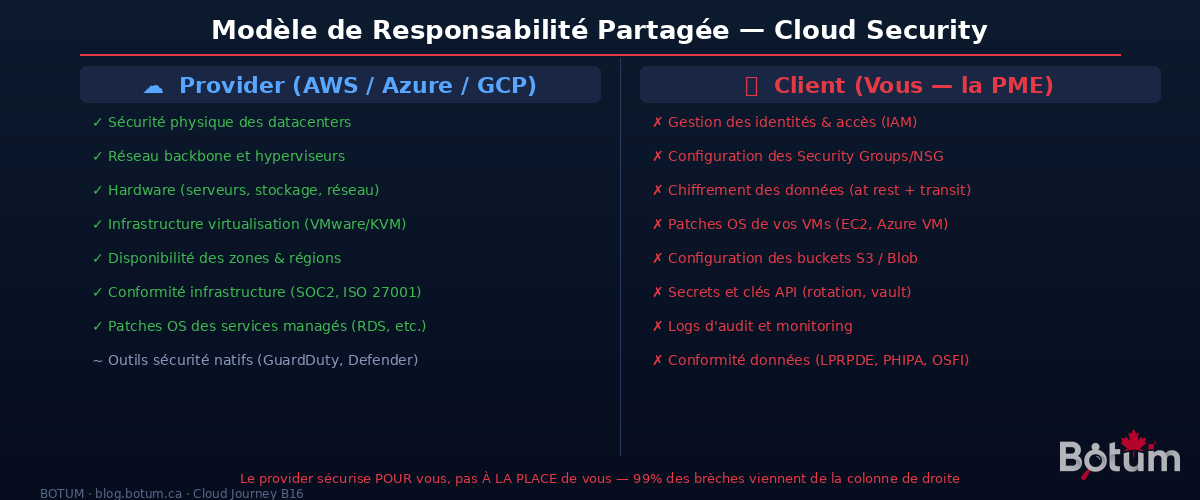
Every major cloud provider clearly communicates their shared responsibility model. In practice, few organizations actually read it — and that's where disasters begin.
What the provider manages (their perimeter):
- Physical security of datacenters (biometric access, guards, geo-redundancy)
- Hardware: servers, storage, backbone network
- Virtualization infrastructure and hypervisors
- Availability and resilience of zones/regions
- Infrastructure compliance (SOC 2, ISO 27001, PCI-DSS at the infra level)
- OS patches for fully managed services (RDS, Lambda, Azure SQL Managed Instance)
What YOU must manage (your perimeter):
- Identity and access management (IAM) — roles, policies, permissions
- Security Groups, NSGs, firewall configuration
- Encryption of your data at rest and in transit
- OS patches for your VMs (EC2, Azure VM) — if you manage the OS, you patch it
- S3 / Azure Blob / GCS bucket configuration — public vs. private
- Management of secrets, API keys, and certificates
- Logs, monitoring, and security alerts
- Regulatory compliance (PIPEDA, PHIPA, OSFI) — the provider doesn't do this for you
The Gartner rule applies perfectly here: "Through 2025, 99% of cloud security failures will be the customer's fault." This isn't criticism of providers — it's the reality of the shared model.
Zero Trust: "Never Trust, Always Verify"
The traditional security model was based on the network perimeter: everything inside the corporate network is "trusted," everything outside is not. The firewall was the fortress, the VPN the drawbridge.
In the cloud, this model is dead. Your resources are spread across multiple regions, multiple providers, multiple teams. Employees work from anywhere. Microservices communicate within the same VPC. There is no more "perimeter" — only identities and resources.
Zero Trust, formalized by John Kindervag at Forrester, rests on three fundamental principles:
- Never implicitly trust — even a request coming from inside the internal network must be authenticated and authorized
- Always verify explicitly — every access is evaluated in real time: who is the user? What is their device? Where does the request originate? How sensitive is the resource?
- Assume breach — architect as if the attacker is already inside the network. Segment to limit the blast radius.
Practical Zero Trust Implementation in the Cloud
Micro-segmentation: Don't put all your resources in a single subnet. Isolate by function and sensitivity: databases in a private subnet with no internet access, APIs in an application subnet, administration tools in a dedicated subnet accessible only from known IPs (or via VPN/bastion). On AWS: VPC with distinct private/public subnets, granular Security Groups per workload. On Azure: VNet with NSG and Azure Firewall.
MFA everywhere and for everything: Multi-factor authentication is the security measure with the best ROI available. Microsoft reports that MFA blocks 99.9% of password-based attacks. Mandatory for: root / Global Admin accounts, all human accounts with console access, VPN and bastion hosts, access to secrets and vault.
Device trust: Zero Trust also evaluates device state. Access from an unpatched laptop without disk encryption should be denied or limited. AWS Verified Access and Azure Conditional Access evaluate device compliance before granting access. Integrate with your MDM (Jamf, Microsoft Intune) to automate these checks.
Short-lived sessions principle: Instead of long-lived credentials (API keys that never change), use temporary tokens. AWS STS generates temporary credentials valid for a maximum of 1 hour. Azure Managed Identities completely eliminate secret management for Azure services.
IAM: The Principle of Least Privilege, Rigorously Applied
Identity and access management is, by far, the area where SMBs make the most mistakes — and where the consequences are most severe.
Roles vs. Policies vs. Service Accounts
Policies define WHAT you can do (Allow/Deny on specific actions and resources). Roles group policies and can be assumed by users or services. Service Accounts (or Managed Identities on Azure) are identities for applications, not humans.
Least privilege in practice:
- Never grant
*:*(all actions on all resources) — even temporarily "to debug" - Use granular policies: a log-reading service should only have
logs:GetLogEvents, notlogs:* - Separate human roles by function: developer ≠ ops ≠ security ≠ admin
- Quarterly access review: remove unused permissions (AWS IAM Access Analyzer detects permissions unused for 90 days)
Service Accounts and Key Rotation
Every service calling a cloud API should have its own identity with minimal permissions. No account shared between multiple applications. And above all:
- Automatic rotation of access keys every 90 days maximum
- Prefer IAM Roles over static access keys for EC2 / Lambda / Kubernetes services (roles have no key — they use automatic temporary tokens)
- Audit existing keys: AWS IAM Access Analyzer and Azure Credential Scanner identify keys unused for extended periods
Mandatory MFA on All Human Accounts
Enforce MFA via an IAM policy that denies all actions except iam:EnableMFA until the user has configured their authenticator. Example AWS policy:
{
  "Effect": "Deny",
  "NotAction": ["iam:EnableMFA", "iam:GetUser"],
  "Resource": "*",
  "Condition": {
    "BoolIfExists": {"aws:MultiFactorAuthPresent": "false"}
  }
}
Audit Logs: Your Black Box
CloudTrail (AWS), Azure Monitor Activity Log, and GCP Audit Logs record all API actions on your account. These logs are your first line of defense after an incident — and often the only way to understand what happened. Mandatory configuration:
- Enable multi-region CloudTrail with S3 export + CloudWatch alerts on critical events (LoginWithNoMFA, DeleteTrail, ConsoleLogin from an unknown IP)
- Minimum retention: 90 days active + 1 year in cold storage
- Centralize logs in a separate account — an attacker who compromises your main account shouldn't be able to delete their traces
Cloud Network Security
Security Groups (AWS) / NSG (Azure): Security groups are stateful firewalls at the instance level. Golden rule: deny by default, allow explicitly. Close port 22 (SSH) to the internet — use AWS Systems Manager Session Manager or Azure Bastion for administrative access without exposing ports. Never a 0.0.0.0/0 rule on SSH or RDP.
VPC / VNet Isolation: Isolate workloads by environment (prod VPC ≠ staging VPC) and sensitivity. VPC Peering for controlled inter-VPC communication. PrivateLink / Private Endpoints to access managed services (S3, RDS, Key Vault) without going through the internet.
NACLs (Network Access Control Lists): Additional defense layer at the subnet level (stateless). Less granular than security groups, but useful for blocking malicious IP ranges at the network level.
WAF (Web Application Firewall): AWS WAF, Azure Front Door WAF, or GCP Cloud Armor protect your APIs and web applications against OWASP Top 10 attacks (SQL injection, XSS, etc.). Enable managed rule sets (Core Rule Set) and configure rate limiting to counter brute force attacks.
DDoS Protection: AWS Shield Standard (included free) protects against common volumetric DDoS attacks. AWS Shield Advanced ($3,000/month) offers more sophisticated protection with access to Amazon's DDoS Response Team. Azure DDoS Protection Standard and GCP Cloud Armor offer equivalent options.
Encryption: Data at Rest and in Transit
At rest — AES-256: Enable encryption on all your volumes (EBS, Azure Disk, GCP Persistent Disk), buckets (S3 SSE, Azure Blob Encryption, GCS), and databases (RDS, Azure SQL, Cloud SQL). On AWS, aws:kms allows using your own keys via KMS. It's a checkbox — but verify it's checked on ALL your resources, not just new ones.
In transit — TLS 1.3: All traffic between your services must be encrypted. Between client and API: HTTPS (TLS 1.3 minimum, disable TLS 1.0/1.1). Between internal services in a VPC: mTLS (mutual TLS) for bidirectional authentication. AWS ACM (Certificate Manager) manages your TLS certificates for free with automatic renewal.
KMS / Key Vault: Key Management
Encryption without solid key management is like a locked door with the key under the mat. Cloud key management services are designed for exactly this:
- AWS KMS: managed service, native integration with S3, EBS, RDS, Lambda. Customer Managed Keys (CMK) give you control. Regional keys, complete audit trail in CloudTrail.
- Azure Key Vault: stores keys, secrets, and certificates. Premium tier uses FIPS 140-2 Level 2 HSMs. Native integration with all Azure services via Managed Identity.
- GCP Cloud KMS: centralized management with Cloud HSM available. Key Access Justification (Cloud EKM) lets you see and approve/deny every access to your keys.
Key rotation: Configure automatic annual rotation minimum for your KMS keys. For application secrets (passwords, API tokens), rotate every 90 days via AWS Secrets Manager or Azure Key Vault with built-in automatic rotation.
Canadian Compliance: PIPEDA, PHIPA, OSFI
For Canadian SMBs, compliance is not optional — and the cloud doesn't exempt you from it.
PIPEDA (Personal Information Protection and Electronic Documents Act): Governs the collection, use, and disclosure of personal data in Canada. Key cloud requirements:
- Explicit consent before collection
- Privacy breach notification if there is a real risk of significant harm
- Individual access to their data and right of correction
- If your data leaves Canada, understand the laws of the destination country
Data Residency in Canada: PIPEDA doesn't explicitly require it, but many regulated sectors (public, health, finance) require it contractually or by policy. AWS Canada (ca-central-1 in Montreal), Azure Canada (Canada Central in Toronto, Canada East in Quebec), and GCP Canada (northamerica-northeast1 in Montreal, northamerica-northeast2 in Toronto) all offer Canadian regions. Verify that your backups and logs also stay in Canada — default replication region pairs may export to US regions.
PHIPA (Personal Health Information Protection Act, Ontario): Regulates health data of Ontario residents. Health information custodians (hospitals, clinics, pharmacies, health apps) must:
- Use cloud providers that sign Health Privacy Agreements
- Limit access to health data to the strict minimum (direct IAM principle)
- Maintain audit logs of all access to health data
- Notify the Privacy Commissioner in case of breach within 24-72 hours
OSFI (Office of the Superintendent of Financial Institutions): For federally regulated financial institutions (banks, insurers, credit unions), Guideline B-10 on third-party risk management requires:
- Formal risk assessment before any cloud engagement
- Control of critical data and right to audit cloud providers
- Documented resilience and exit strategies
- OSFI notification for "material" services hosted in the cloud
Comparison Table: AWS vs Azure vs GCP — Native Security Tools
| Category | AWS | Azure | GCP |
|---|---|---|---|
| IAM | AWS IAM, IAM Access Analyzer, Organizations SCP | Azure AD / Entra ID, RBAC, PIM (Privileged Identity) | Cloud IAM, Workforce Identity Federation |
| Secrets Management | Secrets Manager, Parameter Store, KMS | Key Vault (secrets + keys + certificates) | Secret Manager, Cloud KMS, Cloud HSM |
| Threat Detection | GuardDuty, Security Hub, Detective | Microsoft Defender for Cloud, Sentinel | Security Command Center, Event Threat Detection |
| Network Security | Security Groups, Network Firewall, WAF, Shield | NSG, Azure Firewall, WAF, DDoS Protection | VPC Firewall Rules, Cloud Armor, Cloud IDS |
| Compliance / Audit | AWS Config, CloudTrail, Audit Manager, Artifact | Azure Policy, Activity Log, Compliance Manager | Cloud Audit Logs, Security Command Center, Assured Workloads |
| Encryption | KMS (CMK), ACM (TLS certificates), CloudHSM | Key Vault, Azure Disk Encryption, Azure HSM | Cloud KMS, Cloud HSM, CMEK on all services |
| Vulnerability Scanning | Amazon Inspector (EC2, containers, Lambda) | Microsoft Defender for Servers / Containers | Artifact Registry Vulnerability Scanning |
Common Mistakes That Open the Door to Attackers
🚨 AWS Keys Hardcoded in Git
This is mistake number one, found in almost every SMB audit. A developer pushes a commit with AWS_ACCESS_KEY_ID=AKIA... in a config file. GitHub (or GitLab) exposes this repo publicly — often by accident. Bots continuously scan GitHub and retrieve these keys in under 4 minutes. Result: an attacker mines Bitcoin on your AWS account at $50,000 per day.
Solution: git-secrets (AWS Labs) or detect-secrets as a pre-commit hook. AWS Secrets Manager + IAM Roles to eliminate static keys. GitHub Advanced Security to detect secrets in existing history.
🚨 Public S3 Buckets
AWS forced the "Block Public Access" configuration by default in April 2023 — but accounts created before that date may still have public buckets. A public S3 bucket potentially means a customer database, backups, or config files exposed to the internet. Check: aws s3api list-buckets + aws s3api get-bucket-acl or use AWS Config Rule s3-bucket-public-read-prohibited for automatic auditing.
🚨 Disabled or Non-Centralized Logs
CloudTrail, VPC Flow Logs, S3 Access Logs — SMBs disable them "to save on storage." Result: when an incident occurs, it's impossible to trace what happened, who did what, and since when. The cost of security logs is negligible (a few tens of dollars per month for an average account). The cost of their absence during an incident can reach hundreds of thousands of dollars.
🚨 No MFA on Root / Global Admin Account
The AWS root account or Azure Global Administrator is the master key. Without MFA, a compromised password (phishing, password spray) gives the attacker total, immediate, and irreversible access. Enable MFA on these accounts today, now, before continuing to read this post.
🚨 Overly Permissive Security Groups "Temporarily"
"I'll open port 22 from everywhere temporarily to debug" — and the rule stays there for months. Security groups should be reviewed every 90 days. AWS Config Rule restricted-ssh automatically detects Security Groups that allow SSH from 0.0.0.0/0.
BOTUM Real Case: 23 Critical Vulnerabilities, Remediated in 2 Weeks
Context: Quebec digital marketing agency, 45 employees, AWS stack (EC2, RDS, S3, CloudFront, Lambda). The newly appointed CISO contacts BOTUM for a complete cloud security audit — "just to see where we stand." They thought they were in good shape.
Audit findings (week 1):
- 3 active AWS keys in public GitHub repos — including a key with
AdministratorAccesspermissions pushed 8 months ago, still active - 2 public S3 buckets containing customer database exports (names, emails, phone numbers)
- 17 Security Group rules allowing SSH or RDP from
0.0.0.0/0 - CloudTrail disabled in us-east-1 region (where 60% of their workloads ran)
- No MFA on 6 human IAM accounts, including 2 with AdministratorAccess
- No key rotation — access keys created 3 years ago still active
- RDS exposed to the internet (port 3306 open from 0.0.0.0/0) — protected only by an 8-character password
Total: 23 critical or high-severity vulnerabilities, representing a composite CVSS risk of 9.1/10.
Remediation plan (week 2):
- Immediate revocation of the 3 compromised AWS keys. Audit of all actions performed by these keys over 8 months via CloudTrail.
- Migration to IAM Roles for all EC2 and Lambda applications — zero static keys.
- Block public access on all S3 buckets + customer notification for potentially affected individuals (PIPEDA).
- Enable multi-region CloudTrail with 90-day active retention + S3 export to separate account.
- Close all public SSH/RDP rules — migrate to AWS Systems Manager Session Manager.
- Mandatory MFA enforced via IAM Policy on all human accounts.
- Close RDS port, migrate to private VPC-only access.
Result: 23 critical vulnerabilities → 0 in 14 days. Attack surface reduced by 87%. Cost of remediation: 3 days of BOTUM engineering. Potential cost of a breach on these vulnerabilities: estimated between $500,000 and $2,000,000 CAD (PIPEDA penalties + customer notification + legal fees + reputation).
Conclusion: Cloud Security Is Manageable
Cloud security is not optional for an SMB in 2024. Attackers don't distinguish between a 20-person SMB and a Fortune 500 company — they look for misconfigured settings, exposed keys, and overly broad permissions. These configurations exist in both cases.
The good news: the tools exist, they're native to cloud providers, and most are included in your existing infrastructure costs. A basic security audit — 2 to 3 days — systematically reveals the most critical issues. And fixing them rarely takes more than 2 weeks.
The question isn't "can I afford to do this?" The real question is: "can I afford not to?"
Download this cloud security guide as a PDF.
⬇ Download the guide (PDF)🚀 Cloud Security Audit with BOTUM
Identify your vulnerabilities before they cost you. BOTUM teams perform comprehensive cloud security audits for Canadian SMBs.
Request an audit →
