
Azure vs AWS vs GCP for Canadian SMBs: The Honest Comparison
AWS because 'everyone does it'? A client discovered 70% of workloads ran better on Azure at −30% cost. Field guide: 6-dimension comparison, real cases, 7-situation decision table.
Cloud Journey Series · Post B12
The "Everyone Uses AWS" Trap
The IT director walks into my office, arms crossed. "We're choosing AWS. That's what everyone does." Three months later, his 85 VMs are running on EC2 ca-central-1. The bill is 40% over budget. And his team realizes that 70% of their workloads — primarily Exchange, SharePoint, and a dozen .NET apps on Windows Server — would have run better on Azure, with native integration they had to configure manually on AWS.
Recalculating with Azure Hybrid Benefit on existing Windows Server licenses, plus 3-year VM reservations, gives −30% on the total bill. Not an anecdote. A real case. And the reverse migration cost 3 additional months of effort.
This guide doesn't claim one cloud is universally better. It gives you the criteria to choose the right one for your actual situation.
The Canadian Context: What Changes Everything
Before comparing prices, there are non-negotiable legal constraints for Canadian SMBs.
PIPEDA and Quebec Law 25
The Personal Information Protection and Electronic Documents Act (PIPEDA) governs personal data processing in Canada. Quebec Law 25 (in force since 2022) imposes additional obligations for Quebec organizations: explicit consent, privacy impact assessments (PIAs), and data localization.
The practical consequence: your personal data must generally stay on Canadian soil. All three clouds have Canadian regions, but they're not equivalent.
Canadian Regions for All 3 Clouds
| Cloud | CA Regions | Toronto Latency | Montreal Latency |
|---|---|---|---|
| Azure | Canada Central (Toronto) Canada East (Quebec City) |
< 5 ms | < 10 ms |
| AWS | ca-central-1 (Montreal) ca-west-1 (Calgary — limited) |
~ 10-15 ms | < 5 ms |
| GCP | northamerica-northeast1 (Montreal) northamerica-northeast2 (Toronto) |
< 5 ms | < 5 ms |
Key point: Azure is the only cloud with a region in Quebec City — which matters for organizations subject to Law 25 wanting intra-provincial DR resilience.
The 6-Dimension Comparison
| Dimension | Azure | AWS | GCP |
|---|---|---|---|
| Canadian Presence | ⭐⭐⭐⭐⭐ 2 regions incl. QC City |
⭐⭐⭐⭐ 2 regions (Mtl + limited Calgary) |
⭐⭐⭐⭐ 2 regions (Mtl + Toronto) |
| Microsoft Ecosystem | ⭐⭐⭐⭐⭐ Native: M365, AD, SQL, .NET |
⭐⭐⭐ Third-party integration possible |
⭐⭐ Few native MS integrations |
| Service Catalog | ⭐⭐⭐⭐ ~200 services |
⭐⭐⭐⭐⭐ 240+ services, leader |
⭐⭐⭐ ~150 services, data/ML focus |
| SMB Pricing | ⭐⭐⭐⭐⭐ Hybrid Benefit, CSP, MPSA |
⭐⭐⭐⭐ Reserved + Savings Plans |
⭐⭐⭐⭐ Auto Sustained Use, CUDs |
| SMB Support | ⭐⭐⭐⭐ Strong CSP partners in CA |
⭐⭐⭐⭐⭐ Largest partner ecosystem #1 |
⭐⭐⭐ Fewer partners in CA |
| CA Compliance | ⭐⭐⭐⭐⭐ PIPEDA, Law 25, SOC2, ISO27001 |
⭐⭐⭐⭐ PIPEDA, SOC2 — no QC region |
⭐⭐⭐⭐ PIPEDA, SOC2 — 2 CA regions |
Azure: When It's the Right Choice
If your SMB has an existing Microsoft environment — Office 365, Active Directory, SQL Server, .NET applications, Windows Server licenses — Azure isn't just "an option." It's the obvious answer.
Concrete Arguments
- Azure Hybrid Benefit: Have Windows Server licenses with Software Assurance? You can use them on Azure, saving up to 40% on Windows VM costs. Same for SQL Server: an on-prem SQL Enterprise license = Azure SQL Managed Instance with no additional license cost.
- Azure AD / Entra ID: If your users are in Active Directory, Azure AD Connect syncs in 20 minutes. SSO authentication to cloud apps is native. AWS would require AD Connector or IAM Identity Center setup — doable, but not free in time or complexity.
- 2 Canadian regions including Quebec City: For organizations subject to Quebec Law 25 wanting intra-provincial DR, Azure Canada East (QC City) + Canada Central (Toronto) is the only native option among the 3 clouds.
- M365 Copilot and Microsoft AI: If you plan to adopt Microsoft AI tools, Azure OpenAI Service is the only cloud where you can deploy them privately, with data residency guarantees in Canada.
Real Case: 180-User SMB, Microsoft Stack
Client: industrial distributor, 180 employees, Quebec. Infrastructure: 45 VMs (Windows Server 2016/2019), SQL Server 2019 Standard, Exchange Server, SharePoint on-prem, branches in Montreal and Toronto.
Migration to Azure Canada Central + Canada East. With Azure Hybrid Benefit on 45 Windows Server licenses and 8 SQL Server licenses, plus 3-year Reserved VM Instances for stable workloads:
- Monthly cost before: 28,400 CAD (infrastructure + licenses)
- Monthly cost after Azure: 18,460 CAD
- Savings: −35% · Investment recovery: 8 months
AWS: When It's the Right Choice
AWS remains the most mature and complete cloud. If you're not in a Microsoft ecosystem and want the broadest service catalog with the most active community, AWS is hard to beat.
Concrete Arguments
- Service catalog: 240+ managed services. If you're looking for a cloud service that exists, AWS probably has it. And often longer than others, with richer documentation and a larger community.
- Partner ecosystem in Canada: The largest number of certified AWS partners in the country. For an SMB wanting local resources (consultants, integrators, MSPs), AWS offers the best choice.
- Reserved Instances and Savings Plans: On a 1-year commitment, −40% vs on-demand. Over 3 years, up to −60%. For predictable workloads, this is the most effective cost-reduction tool on the market.
- ca-central-1 (Montreal): The Canadian AWS region is mature, with the majority of services available (unlike ca-west-1 Calgary, which remains limited).
Real Case: B2B SaaS Startup
Client: HR SaaS, 35 employees, US + CA expansion. Stack: Node.js, PostgreSQL, Redis, ElasticSearch. Multi-tenant, 3x growth expected in 18 months.
Chose AWS ca-central-1. Amazon RDS PostgreSQL + ElastiCache + OpenSearch. Auto Scaling Groups for application servers. 1-year Savings Plans on base instances.
- Ability to absorb a 10x traffic spike without manual intervention
- Multi-region US (us-east-1) deployment in 2 weeks using the same patterns
- Infrastructure cost: 4,200 CAD/month for 50,000 active users
- AWS Activate startup credits: 100,000 USD used over 18 months
GCP: When It's the Right Choice
GCP is underestimated by SMBs. Its reputation as a "cloud for data scientists" sticks, but there are cases where GCP is objectively the best choice — sometimes by a wide margin.
Concrete Arguments
- GKE (Google Kubernetes Engine): Google invented Kubernetes. GKE remains technically superior to AKS (Azure) and EKS (AWS) in terms of operational ease, auto-upgrade, and total cost. If your organization is Kubernetes-first, GKE is the natural choice.
- BigQuery: For SMBs with analytics needs, BigQuery is in a league of its own. No server to manage, per-query billing (5 USD/TB analyzed), and performance on terabytes of data that would require a much more expensive Redshift or Synapse cluster at AWS/Azure.
- Sustained Use Discounts: Unlike AWS and Azure requiring explicit reservations, GCP automatically applies discounts up to 30% if you use an instance more than 25% of the month. For unpredictable workloads, this is a real advantage.
- Cheaper egress: GCP charges network egress ~30% less than AWS and Azure. For architectures with high outbound data transfer (public APIs, non-included CDN, analytics exports), this can represent thousands of dollars in monthly savings.
Real Case: Data-Intensive SMB
Client: data marketing agency, 45 employees. Daily processing: 2 TB of event data (clicks, conversions, attributions). Analytics stack: dbt + BigQuery + Looker. Kubernetes workloads for APIs.
Comparison with AWS Redshift + EKS: GCP (BigQuery + GKE) came in at −28% over 12 months. The combination of on-demand BigQuery + Sustained Use Discounts on GKE vs. Redshift RA3 + EKS cost showed a significant gap.
- BigQuery queries: 0 to provision, 0 to tune
- GKE autopilot: Kubernetes infrastructure with no nodes to manage
- Savings vs AWS: −28% · Migration timeline: 6 weeks
Quick Decision Guide
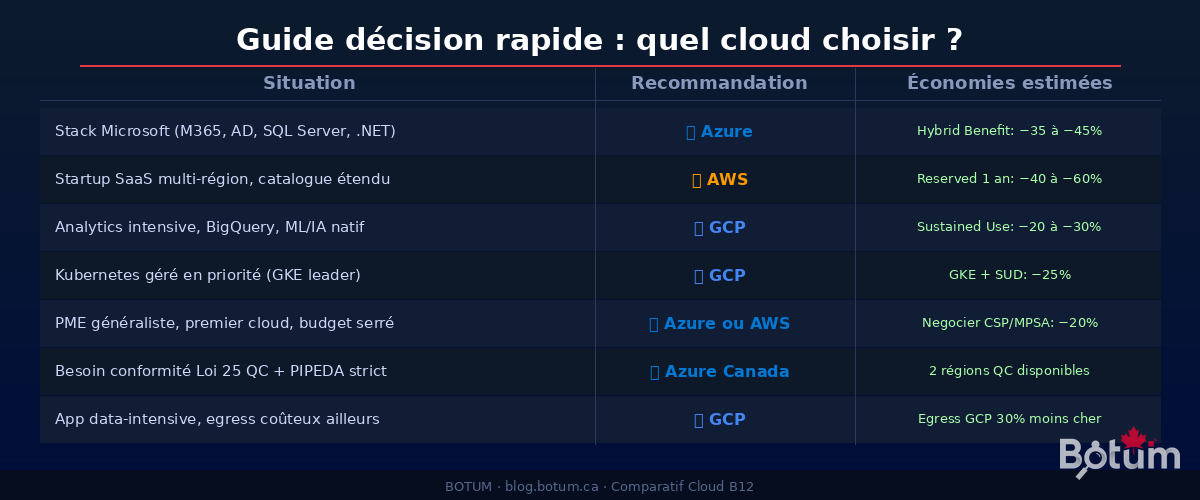
| Situation | Recommendation | Estimated Savings |
|---|---|---|
| Microsoft stack (M365, AD, SQL Server, .NET) | Azure | Hybrid Benefit: −35 to −45% |
| Multi-region SaaS startup, broad catalog needed | AWS | Reserved 1 yr: −40 to −60% |
| Intensive analytics, BigQuery, native ML/AI | GCP | Sustained Use: −20 to −30% |
| Managed Kubernetes priority, DevOps teams | GCP | GKE + SUD: −25% |
| General SMB, first cloud, tight budget | Azure or AWS | Negotiate CSP/MPSA: −20% |
| Quebec Law 25 + strict PIPEDA, intra-provincial DR | Azure | 2 QC regions available |
| Data-intensive app, expensive egress elsewhere | GCP | GCP egress 30% cheaper |
Pitfalls to Absolutely Avoid
1. Egress: The Invisible Cost That Explodes Budgets
All three clouds charge for outbound traffic. Rates converge around 0.08–0.09 USD/GB, but details diverge. AWS charges egress to the Internet AND between regions. Azure offers a waiver on inter-regional traffic within the same continent. GCP is generally the cheapest of the three on egress.
Concrete example: a SaaS application transferring 50 TB/month to its customers = 4,000–4,500 USD/month just in egress on AWS or Azure. On GCP, around 2,800 USD. Over 12 months: 14,000–20,000 USD difference. Check your egress profile before choosing.
2. Vendor Lock-In: More Subtle Than You Think
Real lock-in doesn't come from VMs (easy to migrate). It comes from proprietary managed services: Azure Service Bus, AWS DynamoDB, Google Spanner, AWS Lambda (vs Azure Functions vs Cloud Run). Every hour invested configuring DynamoDB is an hour hard to recover if you need to migrate.
Strategy: identify from the start which services are "portable" (PostgreSQL RDS → Azure DB → Cloud SQL) and which are proprietary. Limit lock-in to services where the differential value justifies it.
3. The "Cloud Is Cheaper" Myth
Cloud is not cheaper than on-prem by default. It's more expensive without active FinOps. It's cheaper when:
- You activate reservations (Reserved Instances, Savings Plans, CUDs)
- You do regular right-sizing (oversized instances = money burned)
- You have no idle resources (dev/test environments left running 24/7)
- You manage egress (architecture that minimizes outbound traffic)
Without FinOps, a BOTUM client migrating 40 VMs will often find themselves at +20% costs before optimization, then at −35% after 3 months of active FinOps.
4. Underestimating Support Costs
AWS "Developer" support costs 29 USD/month minimum — useless for production. "Business" support starts at 100 USD/month + 10% of your bill. On 20,000 USD/month of cloud = 2,000 USD/month for support. Multiply by 12: 24,000 USD/year just to have someone answer the phone. Azure and GCP have similar models. Factor this into your TCO from day one.
Conclusion: The Right Cloud Is the One That Fits Your Context
There's no universally best cloud. There's the best cloud for you, based on your stack, your team, your legal obligations, and your 3-year objectives.
If you're Microsoft-heavy, Azure is almost always the right choice — the native ecosystem and Hybrid Benefit make a 30–45% difference on the bill. If you're building a multi-region SaaS and want the richest catalog, AWS is the reference. If your workloads are data-intensive or Kubernetes-first, GCP deserves serious evaluation.
What doesn't change: the choice must be made before migrating, based on a portfolio assessment and a comparative 3-year TCO. Not after committing 3 months of migration in the wrong direction.
Download this comparison guide as PDF.
⬇ Download the guide (PDF)🚀 Go Further with BOTUM
Choosing the right cloud is strategic. BOTUM teams help Canadian SMBs evaluate and deploy cloud solutions.
Discuss your project →
